
Table of Contents

This post may contain affiliate links, meaning we may earn a small commission at no extra cost to you. We only recommend products we trust, and your support helps us continue creating helpful content.
GetResponse Review: Features, Pricing, Pros and Cons
If you are a blogger, freelancer, or online business owner, you already know that your email list is your most valuable asset. It’s the one thing you actually own in a world of ever-changing social media algorithms. But as your business grows, you realize that simple newsletters aren’t enough. You need automation, landing pages, and maybe even a way to host webinars without paying for five different subscriptions.
In this GetResponse review, we looked at the platform’s features, pricing, and whether it’s worth using for bloggers and side hustlers.
I’ve spent years testing different platforms, and I know how overwhelming it can be to pick the right one. Is GetResponse worth the investment for a new side hustler? Does it live up to the hype for advanced marketers? Let’s break it down.
In this guide, you’ll learn:
- what GetResponse is
- its key features
- pricing and plans
- pros and cons
- who should use it
If you’re ready to stop juggling five different apps and want a platform that grows with your income, I highly recommend giving GetResponse a try. You can start building your list today and see why it’s a favorite for serious creators.
GetResponse email marketing software summary
- GetResponse is a powerful email marketing tool with smart automation features.
- Setting up campaigns is super easy. GetResponse helps you at each step of the way.
- Lots of templates available for emails, landing pages, funnels, and forms. Although some can do with an update.
- I loved the easy integration with analytics and other software.
- Pricing is competitive and it’s easy to scale as your business grows.
As a well-rounded email marketing and automation tool, I recommend you have a look at GetResponse. Start free with 500 subscribers. Save 18% annually or Save 30% off with a 2-year plan.

What Is GetResponse? (GetResponse Review Overview)
GetResponse is an all-in-one email marketing platform that allows businesses to:
- build email lists
- send newsletters
- automate email campaigns
- create landing pages
- host webinars
- build sales funnels
It combines email marketing, automation, and funnel building into one marketing platform.
If you’re still learning the fundamentals of email marketing, check out my guide on email marketing for beginners.
Why You Need a Tool Like This
When I first started, I thought I could “wing it” with a basic free tool. But soon, I realized that I was leaving money on the table because I couldn’t segment my audience or create high-converting landing pages easily. Using getresponse email marketing allows you to be professional from Day 1.
GetResponse Features

GetResponse includes several powerful features that go beyond basic email marketing. While some platforms just let you send a “blast” and hope for the best, GetResponse is built to be a full-scale marketing department for your blog.
I want to make sure you see exactly what you’re getting. Here is the full breakdown of the getresponse features that can actually move the needle in your business.
Email Campaign Builder

The platform includes a drag-and-drop email builder that makes it easy to design newsletters and campaigns. I love this because you don’t need to be a graphic designer or know a single line of code to look professional.
You can create emails using:
- Text blocks: For that personal, letter-style feel I always recommend.
- Images: To show off your latest project or product.
- Buttons: High-contrast “Call to Action” buttons that actually get clicked.
- Product sections: Perfect if you’re selling your own printables or courses.
Pre-designed templates help users build professional-looking emails quickly. Many creators use these features to build newsletters using strategies similar to those described in my guide on how to create an email newsletter.
Pro-Tip: Don’t over-design! I’ve found that simple, text-heavy emails often get higher engagement because they feel like they’re coming from a real person.
Marketing Automation

One of GetResponse’s strongest features is its marketing automation system. This is the “brain” of your business that works while you’re sleeping, traveling, or hanging out with your family.
You can create workflows that send emails based on subscriber actions. Examples include:
- Welcome email sequences: To introduce yourself and deliver your freebie immediately.
- Lead nurturing campaigns: To build trust over several days or weeks.
- Product recommendation sequences: To suggest the perfect affiliate product based on what they clicked.
These workflows support the advanced strategies I talk about in my email marketing automation guide, it expalains how these workflows work. Automation allows you to nurture subscribers without manually sending emails, which is the only way to truly scale a side hustle.
Conversion Funnels
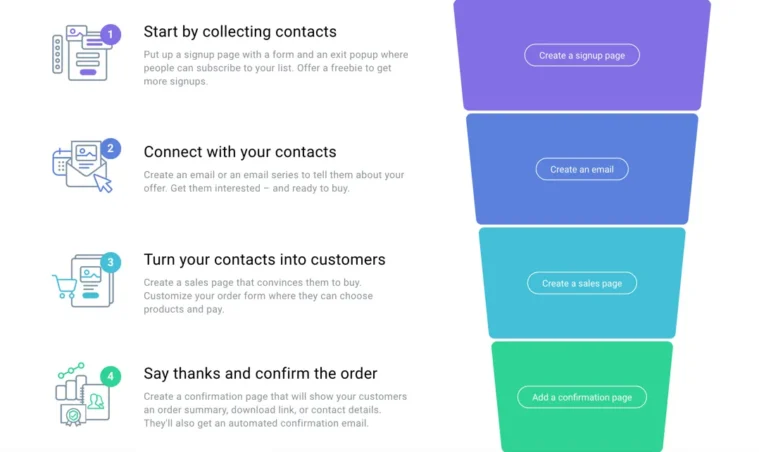
GetResponse includes built-in conversion funnel tools. If the word “funnel” sounds scary, don’t worry—it’s just a path you lead your reader down so they can get the most value from you.
These funnels combine several marketing components, including:
- Landing pages: To grab their attention.
- Signup forms: To get them on your list.
- Automated emails: To provide value.
- Sales pages: To make the final offer.
This feature allows users to create complete marketing funnels from one platform, saving you from having to pay for three different subscriptions. Funnels are commonly used when implementing strategies like how to monetize an email list.
Landing Page Builder
If you want to grow your list fast, you need a dedicated place for people to sign up. GetResponse includes a landing page builder designed to help collect email subscribers.
Users can create landing pages for:
- Lead magnets: Like my favorite checklists or PDF guides.
- Webinars: To register your audience for a live training.
- Product promotions: For specific launches or flash sales.
Landing pages are critical for strategies like how to build an email list. The platform provides templates that simplify the process, so you can have a high-converting page live in under 15 minutes.
Webinar Hosting
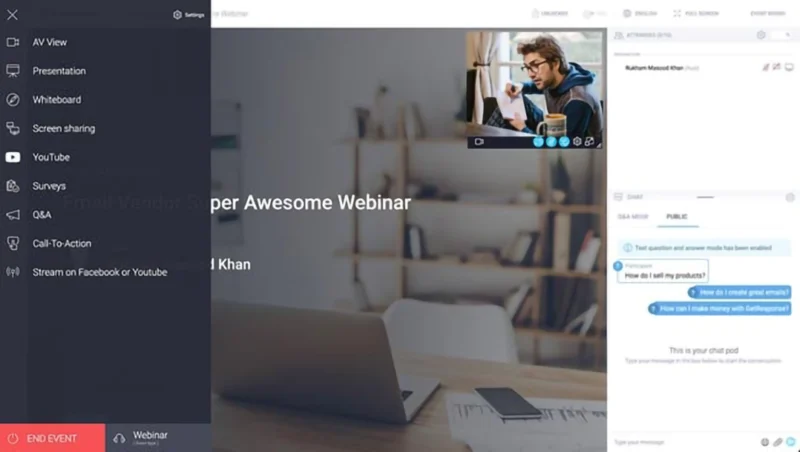
One feature that differentiates GetResponse from many competitors is built-in webinar hosting. This is a huge value add. Usually, webinar software costs $100+ a month on its own!
Webinars can be used for:
- Product demonstrations: Show people exactly how to use what you’re selling.
- Online training: Provide massive value and build authority.
- Marketing presentations: To launch a new course or coaching program.
Combining webinars with email automation allows marketers to create powerful campaigns. You can automatically follow up with people who attended (and those who didn’t!) to maximize your conversions.
Subscriber Segmentation
You never want to send an email about “How to Start a Blog” to someone who has been blogging for five years. Segmentation prevents this. GetResponse allows users to segment subscribers based on behavior and engagement.
For example, you can segment subscribers who:
- Opened an email: Your most engaged fans.
- Clicked a link: People interested in a specific topic.
- Downloaded a resource: People who are ready to learn.
- Attended a webinar: Your “hot” leads.
Segmentation helps improve engagement by delivering more relevant content. When you send people exactly what they want, your affiliate income (and your trust) goes through the roof!
GetResponse Pricing (Full Review Breakdown)

One of the most common questions I get is about the cost. After all, when you are building a side hustle, every dollar counts! Getresponse pricing is tiered based on the number of subscribers you have and the specific features you need.
I always tell my readers: don’t pay for the most expensive plan just because it sounds “cool.” Start with what you need today and scale as your income grows. Below is the verified monthly pricing structure for 2026.
GetResponse Pricing Comparison (Monthly Billing)
| Number of Contacts | Starter Plan | Marketer Plan | Creator Plan |
| Up to 1,000 | $19 /mo | $59 /mo | $69 /mo |
| Up to 2,500 | $29 /mo | $69 /mo | $79 /mo |
| Up to 5,000 | $54 /mo | $95 /mo | $109 /mo |
| Up to 10,000 | $79 /mo | $114 /mo | $134 /mo |
| Up to 25,000 | $174 /mo | $215 /mo | $249 /mo |
Savings Tip: If you are ready to commit to growing your list long-term, you can save 18% by switching to an annual plan or a massive 30% with a two-year plan. That is a lot of extra money you can put back into your business!
See Current GetResponse Pricing & Start Your Free Account
Breaking Down the Plans: Which One Do You Need?
Choosing a plan can feel overwhelming, so let’s look at what you actually get at each level.
The Free Plan ($0/mo)
GetResponse offers a limited free plan for beginners. This is the perfect “no-risk” way to get started.
This plan typically includes:
- Up to 500 contacts
- Unlimited email newsletters
- 1 Landing page
- Basic website builder and signup forms
My Take: If you have zero subscribers, start here! You can learn the ropes without spending a dime. Once you hit 500 fans, you’ll be ready to move up to a paid tier.
The Starter Plan
This is the entry-level paid plan, and it’s where most new bloggers land. It unlocks the “autoresponder” feature, which is the secret to building a relationship with your readers.
Paid plans unlock tools such as:
- Unlimited newsletters
- Autoresponders (for your welcome sequence)
- Unlimited landing pages
- Basic segmentation and 24/7 chat support
The Marketer Plan
This is the plan I consider the “sweet spot” for growth. It unlocks the robust getresponse automation features that I love.
Key tools include:
- Marketing automation: Create visual “if/then” workflows.
- Webinar hosting: Host up to 100 attendees directly in the app.
- Conversion funnels: Build a complete sales path for your products.
- 3 Users: Perfect if you have a Virtual Assistant helping you.
The Creator Plan
If you are a serious content creator or business owner, this plan turns your email list into a full-blown ecommerce machine.
Key tools include:
- Advanced marketing automation
- Professional webinars (up to 500 attendees)
- AI-powered course creator
- Paid newsletter features to monetize your writing directly
Pro-Tip: Watch Out for “Duplicate” Contacts! Here is a little-known fact that can save you a lot of money: GetResponse treats each list as a separate entity. If the same person is on your “General Newsletter” list and your “Lead Magnet” list, they count as two subscribers. Keep your lists clean and use tags instead of separate lists to keep your monthly bill as low as possible!
GetResponse Pros and Cons
Before we dive into the nitty-gritty, I want to be 100% transparent with you.
Choosing an email marketing tool is like choosing a house for your business—you need to make sure the foundation is solid before you move in. I’ve spent years testing just about every platform under the sun, and if there’s one thing I’ve learned, it’s that there is no “one size fits all” solution.
What works for a high-traffic ecommerce site might be total overkill for a new blogger just starting out. I want to give you an honest, no-fluff look at what I actually think of this platform and whether it fits your specific side hustle goals.
The Pros (What I Love)
- The All-In-One Power: You don’t need a separate landing page builder or webinar tool. Having everything under one roof isn’t just easier—it saves you nearly $100 a month in extra subscriptions.
- The Visual Automation: I’m a visual learner, and their workflow builder makes it so easy to see exactly how your emails are flowing. You can literally watch the path your customer takes.
- High Deliverability: What’s the point of writing great emails if they don’t get seen? GetResponse has a 99% deliverability rate, meaning your messages actually end up in the inbox.
- Excellent Support: They have a great 24/7 chat. If you’re working on your side hustle at 2:00 AM and get stuck, there’s a real human there to help you in seconds.
The Cons (The Real Talk)
- Paywalled Features: Some of the best stuff (like webinars and the advanced automation builder) is locked behind the “Marketer” tier and above. You won’t find them on the basic or free plans.
- Learning Curve: Because GetResponse does so much, it can take a few days to get the hang of it. It’s a powerful cockpit, but you have to learn what all the buttons do first.
- The “Success Tax”: As your list grows into the tens of thousands, it can get pricey. It’s a great problem to have (more subscribers usually means more money!), but you need to budget for those pricing jumps as you scale.
The Final Verdict
At the end of the day, the “perfect” tool is the one that you actually use to grow your business. If you are looking for a platform that can handle everything from your first 100 subscribers to your first $100,000 launch, GetResponse is a very strong contender. It offers a level of power and integration that most “simple” tools just can’t match.
If you’re tired of outgrowing your software every six months and having to migrate your list (which is a total headache, believe me!), investing in a robust system like this can save you a massive amount of time and stress down the road. My best advice? Start with the free plan, poke around the automation builder, and see if it feels like the right “home” for your brand.
GetResponse vs Other Email Marketing Tools
No review would be complete without looking at how the platform stacks up against its biggest rivals. When you are putting your hard-earned money into a tool, you want to know if you’re getting the best bang for your buck.
I’ve personally migrated lists between almost all of these, so I know where the “pain points” are. Here is how GetResponse compares to the two biggest players in the creator space for 2026.
GetResponse vs. Kit (Formerly ConvertKit)
Kit is the “minimalist” choice for writers, while GetResponse is the “all-in-one” powerhouse for marketers.
| Feature | GetResponse | Kit (ConvertKit) |
| Free Plan Limit | 500 Contacts | 1,000 Contacts |
| Primary Focus | Sales & Marketing Funnels | Newsletters & Creators |
| Webinars | Built-in (Marketer plan+) | None (Requires 3rd party) |
| Automation | Full Visual Builder | Very Limited on Free Plan |
| Starting Price | $19 /mo | $29 /mo |
The Verdict: If you want a larger free list and just want to send simple text emails, Kit wins. Check out my Kit (Formely Convert Kit) review for more information on their features. But if you want to actually automate your sales and host webinars under one roof, GetResponse provides much better value as you scale.
GetResponse vs. MailerLite
This used to be a tougher choice when MailerLite allowed 1,000 subscribers for free. Now that both plans cap at 500, the decision comes down to features vs. simplicity.
| Feature | GetResponse | MailerLite |
| Free Plan Limit | 500 Contacts | 500 Contacts |
| Monthly Email Limit | 2,500 (on Free) | 12,000 (on Free) |
| Ease of Use | Moderate (Powerful) | Very Easy (Simple) |
| Advanced Tools | Funnels & AI Store | Basic Automation |
| Support | 24/7 Chat (from $19/mo) | Email Only (on Free) |
| Starting Price | $19 /mo | $10 /mo |
The Verdict: MailerLite is still the budget king if you need to send a high volume of emails to a small list for free (12,000 vs 2,500). However, once you hit that 500-subscriber wall, GetResponse’s “Starter” plan at $19/mo offers more professional growth tools that can help you monetize your list faster. Check out my MailerLite review for the deep dive on their features.
Who Should Use GetResponse
GetResponse is a powerhouse, but it’s not a “one-size-fits-all” tool. It is ideal for the business owner who wants to move past simple newsletters and build a fully automated sales machine.
I specifically recommend GetResponse for:
- The Funnel Master: If you want to build complex sales paths that turn a stranger into a customer on autopilot, the visual “Conversion Funnel” builder is worth the price of admission alone.
- The Webinar Host: If live training is a core part of your business, having webinars integrated directly with your email list (no Zapier hacks required!) is a game-changer.
- The Digital Product Seller: With the AI course creator and e-commerce store integrations, it is perfect for anyone selling ebooks, templates, or online workshops.
- The Scaler: If you are a company managing high-volume campaigns and need advanced segmentation to ensure your emails hit the right person at the perfect time.
Who Might Prefer a Different Platform
Even though I love the platform, I’m the first to admit it might be “too much tool” for some. You might want to look elsewhere if:
- You Are a Total Tech-Phobe: If you just want to send a basic weekly update and find “automation workflows” intimidating, you might prefer the simplicity and lower price point of MailerLite.
- You Are a “Words-First” Creator: If you are a blogger or podcaster who prefers minimalist, text-heavy emails and doesn’t care about flashy graphics or webinars, Kit (formerly ConvertKit) is designed exactly for your brain.
- You’re on a Shoestring Budget: If your list is under 1,000 people and you need to keep costs at zero, Kit’s free plan is currently more generous than GetResponse’s 500-contact limit.
The Bottom Line: Choosing the right platform depends entirely on your marketing goals. If you plan on staying small and simple, go with MailerLite. But if you have big plans to scale, host events, and build a digital empire, GetResponse is the foundation you want to build on.
FAQ: Everything You Need to Know
Is GetResponse good for email marketing for beginners?
Absolutely! While it has advanced features, the drag-and-drop editor is very intuitive. Plus, their free plan allows you to start for $0 until you hit 500 subscribers, which is perfect for testing the waters without any financial risk.
Does GetResponse offer automation for side hustlers?
Yes, and this is where it really shines. You can set up “if/then” rules. For example: “If they click this link about ‘Freelancing,’ send them my free Freelance Guide.” This type of getresponse automation is how you scale your income without working more hours.
Can I really host webinars on GetResponse?
Yes! This is a standout feature. Most webinar platforms cost $100+ per month on their own. With GetResponse, it’s integrated into your email marketing, so you can invite your subscribers and follow up with them automatically after the webinar ends.
How does GetResponse help with affiliate marketing?
By using their segmentation and funnel tools, you can see exactly what your audience is interested in. If you know a segment of your list loves “Budget Travel,” you can send them specific affiliate offers for travel gear, which leads to much higher conversion rates than a “one size fits all” email.
Is GetResponse better than ConvertKit for bloggers?
It depends on your goals. ConvertKit is very creator-focused and simple. GetResponse is a marketing powerhouse. If you plan on selling products, running funnels, and using landing pages extensively, GetResponse offers more “bang for your buck” in terms of built-in tools.
What is the best way to get started with GetResponse?
I always recommend starting with a clear goal—like building a 5-day welcome sequence. Sign up for the free version, create a simple landing page, and start sharing it on your social media. You’ll be surprised how fast your list can grow when you have the right system in place!
Conclusion
If you are tired of “piecing together” your marketing and want a tool that handles your emails, your pages, and your sales funnels in one place, getresponse email marketing is a fantastic choice. It’s professional, scalable, and powerful.
Don’t wait until you “feel ready” to start your list. The best time to start was yesterday; the second best time is now!
GetResponse email marketing software summary
- GetResponse is a powerful email marketing tool with smart automation features.
- Setting up campaigns is super easy. GetResponse helps you at each step of the way.
- Lots of templates available for emails, landing pages, funnels, and forms. Although some can do with an update.
- I loved the easy integration with analytics and other software.
- Pricing is competitive and it’s easy to scale as your business grows.
As a well-rounded email marketing and automation tool, I recommend you have a look at GetResponse. Start free with 500 subscribers. Save 18% annually or Save 30% off with a 2-year plan.