Table of Contents

This post contains affiliate links. If you click through and buy something, I may earn a small commission, at no extra cost to you. I only recommend tools I’ve actually used or thoroughly researched.
There are a lot of FreshBooks reviews out there. Most of them read like a feature list with a star rating bolted on the end.
This one’s different. It’s an honest take on what FreshBooks actually does well, where it falls short, and whether it’s the right tool for your situation, written for freelancers, small business owners, and bookkeepers who need a straight answer, not a sales pitch.
The short version: FreshBooks is genuinely good software. But it’s not the right tool for everyone. By the end of this post you’ll know exactly which side of that line you fall on.
If you want to compare FreshBooks against Wave and QuickBooks before going deeper, Best Bookkeeping Software for Small Businesses covers all three in one place. If you’re here specifically for FreshBooks, let’s get into it.
What Is FreshBooks?
FreshBooks is cloud-based accounting and invoicing software built for freelancers, self-employed people, and small service businesses.
It’s been around since 2003, which in software terms is a long time, and it’s built a strong reputation specifically because of what it isn’t. It isn’t a complex enterprise accounting platform. It isn’t built for accountants. It’s built for people who need to send invoices, track expenses, and keep their finances organized without feeling like they’re doing homework every time they open it.
That focus is both its strength and its limitation, which is exactly what this review is here to unpack.
FreshBooks Pricing: What Does It Actually Cost?
FreshBooks offers three main plans. Here’s what each covers:
Lite: the entry-level plan, limited to five active clients. Covers invoicing, expense tracking, time tracking, and basic reports. Fine for a very small operation. A real constraint for anyone with more than a handful of clients.
Plus: where most users end up. Removes the tight client cap, adds recurring invoices, automated payment reminders, double-entry accounting, and more detailed reporting. This is where FreshBooks starts to feel like a complete tool.
Premium: for larger operations. Adds more advanced features including project profitability tracking and a higher client limit.
Two things worth knowing before you commit: the price shown during sign-up is often a promotional rate that increases after the initial period, worth reading the small print so it doesn’t catch you off guard. And the 30-day free trial covers the full Plus plan, so you can test the complete feature set before paying anything.
What FreshBooks Does Well
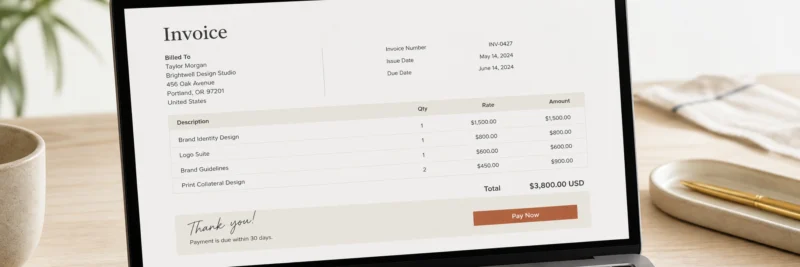
Let’s start with what actually earns FreshBooks its reputation.
Invoicing
This is where FreshBooks genuinely stands out. The invoicing experience is one of the cleanest in this category, professional templates, recurring invoice setup, automatic payment reminders, and online payment acceptance built directly into the invoice. For a freelancer or small service business that sends a lot of invoices, this alone justifies the monthly fee.
The details matter here: clients receive a polished invoice, can pay by card or bank transfer in a couple of clicks, and you get notified when they’ve opened it. No more chasing payments or wondering if an invoice landed in a spam folder.
Ease of use
FreshBooks is genuinely easier to get into than most alternatives, QuickBooks included. The interface is clean, the navigation makes sense, and someone with no accounting background can get up and running without sitting through a series of tutorial videos first.
For freelancers and small business owners who aren’t accountants and don’t want to spend hours learning software, this matters more than any individual feature.
Time tracking
Built in and actually useful, not an afterthought. You can track time directly in FreshBooks, assign it to a client or project, and convert it to an invoice in a couple of clicks. For anyone who bills by the hour, this removes a layer of admin that most people don’t miss until it’s gone.
Client portal
Clients get their own login where they can view invoices, make payments, and see their history with you. It sounds minor. In practice it cuts down the back-and-forth significantly, fewer “can you resend that invoice?” emails, fewer payment chases, fewer questions about what’s owed.
Mobile app
One of the stronger mobile apps in this category. Capturing a receipt on your phone, checking whether an invoice has been paid, logging time between meetings, it actually works in a way that a lot of accounting software mobile apps don’t.
Expense tracking
Connect your bank account, categorize incoming transactions, attach receipts from your phone. Clean, straightforward, and good enough for most freelancers and small service businesses. Not the most powerful expense management tool on the market, but it covers what most people actually need.
Where FreshBooks Falls Short

Here’s where the honest part matters.
Reporting
Solid on higher plans. Noticeably limited on Lite, you get basic income and expense summaries but not much beyond that. Even on Plus, if you need detailed financial reporting, the kind an accountant or a more complex business would want, you’ll feel the gap compared to QuickBooks. Worth testing during the free trial if reporting is important to you.
The Lite plan client cap
Five active clients on the Lite plan is a genuine constraint. Most freelancers and small business owners hit it faster than they expect. If you’re planning to grow, budget for Plus from the start rather than hitting the ceiling mid-month and scrambling to upgrade.
Not as widely used as QuickBooks
For freelance bookkeepers specifically, this matters. QuickBooks is the industry standard, a lot of small business clients already use it, which means you can step into their existing setup without onboarding them to something new. With FreshBooks, you may need to bring the client along with you. Not a dealbreaker, but worth factoring in if you’re building a bookkeeping client base.
No built-in payroll
Payroll isn’t available natively at any FreshBooks tier. You’ll need a third-party integration, Gusto being the most commonly paired option. For most freelancers and solo service businesses this isn’t an issue. For any business with employees who need payroll processed, it’s a gap to know about before you choose.
Lower plan pricing vs features
The Lite plan is restrictive enough that most users end up on Plus anyway. That’s not a criticism of Plus, it’s genuinely a good plan, but it means the entry price point is a little misleading. Go in expecting to pay for Plus and you won’t be caught out.
FreshBooks vs QuickBooks: Which Should You Choose?
This is the comparison most people are running in their heads when they land on a FreshBooks review. Let’s address it directly.
FreshBooks is easier to use, better for invoicing-heavy service businesses, and built for people who aren’t accountants. QuickBooks is more powerful, more widely used by clients, and better for complex financial needs, payroll, detailed reporting, inventory.
Neither is universally better. It depends on your situation.
If you’re a freelancer or small service business who sends invoices regularly, doesn’t need payroll, and wants software that feels good to use, FreshBooks is the cleaner choice. If you’re a freelance bookkeeper who wants to work with the widest range of clients from day one, QuickBooks is worth learning first, simply because more clients already use it.
For the full three-way breakdown, FreshBooks, QuickBooks, and Wave side by side, QuickBooks vs FreshBooks vs Wave covers every angle.
Who Should Use FreshBooks?

FreshBooks is a strong fit if you’re:
A freelancer or self-employed person who sends invoices regularly and wants the whole process to feel professional and painless. A small service business, consultant, designer, photographer, coach, contractor, without complex payroll or inventory needs. If you’re still in the early stages of setting that business up, How to Start a Freelance Business covers the full picture of getting a service-based income off the ground. Someone who finds QuickBooks more than you need but wants something more polished than a free tool. A freelance bookkeeper whose target clients are in the creative or service space.
FreshBooks probably isn’t the right fit if you:
Run a business with employees and need built-in payroll. Need detailed financial reporting beyond the basics. Are a freelance bookkeeper who wants to maximize your client range from day one, in that case, learning QuickBooks first opens more doors.
If you’ve chosen FreshBooks and want to learn to use it properly in a real client context, the free course at Bookkeepers.com covers the practical foundation you’ll need. And if you’re still building your client base, How to Get Bookkeeping Clients (With No Experience) covers that in full. Once real client income starts coming in, Side Hustle Taxes 2026 covers what you’ll owe and what to set aside.
The FreshBooks Free Trial: What to Test First

FreshBooks offers a 30-day free trial on the Plus plan, no credit card required. Here’s how to make the most of it before you decide.
Set up a test invoice. Create a professional invoice and send it to yourself. Check how it looks on mobile. See how the payment process works from the client’s side. If invoicing is the core of what you’ll use FreshBooks for, you want to know it feels right before you pay for it.
Connect a bank account and categorize a few transactions. This is where most of the day-to-day work happens. Does the categorization feel intuitive? Does the bank connection work smoothly?
Run a profit and loss report. Pull a basic P&L and see if it gives you what you actually need. Reporting limitations show up here, better to find out during the trial than after month three.
Test the mobile app. Download it, capture a receipt, check an invoice status. If you’re going to use FreshBooks on the go, the mobile experience matters.
If those four things feel right, FreshBooks is probably a good fit. If anything feels limiting or clunky, that’s useful information before you’ve spent a dollar.
Start your free 30-day FreshBooks trial here, no commitment, full Plus plan access from day one.
The Honest Verdict
FreshBooks earns its reputation. For freelancers and small service businesses who send invoices regularly and want software that feels good to use, it’s one of the best options in its category.
The limitations are real, the Lite plan client cap, the payroll gap, the reporting ceiling on lower tiers, but for the right user, none of them are dealbreakers. And the 30-day free trial makes it a no-risk decision to test before committing.
If you’re still weighing it against Wave and QuickBooks, Best Bookkeeping Software for Small Businesses gives you the full comparison.
And if FreshBooks sounds like the right fit, go try it free for 30 days. You’ll know by the end of the first week.