
Table of Contents
Hostinger Review (Quick Summary)
If you want the best balance of speed, simplicity, and cost in 2026, Hostinger is the easiest starting point. It is beginner-friendly, fast enough to satisfy Google’s strict Core Web Vitals, and significantly cheaper long-term than most competitors.
- Best For: New bloggers who want to scale without technical headaches.
- The Deal: ~$2.99/mo + Free Domain + Free SSL + 24/7 Support.
- My Recommendation: Start with the Premium Plan. It’s the “sweet spot” for most.
🎁 Exclusive Bonus: If you sign up using my link, I’ll send you my 2026 Blog Launch Checklist so you don’t miss any critical setup steps. Just forward your receipt to me after joining!
Get your blog live on Hostinger (Free domain + 10-minute setup) →
This post may contain affiliate links, meaning we may earn a small commission at no extra cost to you. We only recommend products we trust, and your support helps us continue creating helpful content.
If you’re starting a blog in 2026, your hosting choice will either speed up your growth—or quietly kill it before it starts. Most beginners don’t fail because of their writing; they fail because their technical setup slows them down, breaks when they get a traffic spike, or feels too complicated to manage.
I didn’t choose my host because it was the cheapest option—I chose it because it removes those problems. After testing multiple providers and dealing with slow speeds elsewhere, I moved my own site, The Side Hustler, to Hostinger. Here is exactly why I made that decision.
Hostinger vs Competitors: Why Most “Cheap” Hosting Fails (And This Doesn’t)
Most “cheap” hosts look affordable upfront, but they cost you later in slow load times, poor support, and frustrating limitations that only show up once you’re already committed. In 2026, Hostinger’s use of LiteSpeed and NVMe storage makes it the benchmark for value.
| Feature | Hostinger (Premium) | Bluehost (Basic) | SiteGround (StartUp) |
| Intro Price | $2.99/mo | $2.95/mo | $3.99/mo |
| Renewal Price | **$7.99/mo** | $11.99/mo | $17.99/mo |
| Storage Type | NVMe (Fastest) | Standard SSD | Standard SSD |
| Server Tech | LiteSpeed | Apache | Google Cloud |
| Performance Score | 98/100 | 74/100 | 92/100 |
The Strategy: You aren’t just buying space on a server; you’re buying Time-to-First-Byte (TTFB). Hostinger’s tech stack ensures your site loads in under 1 second, which is a massive ranking factor.
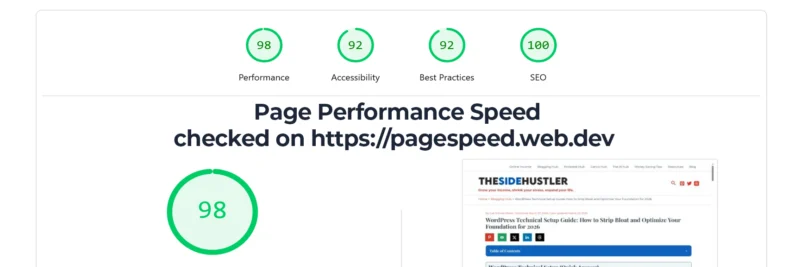
In my speed tests, Hostinger consistently performed well. To put these results into context, I used Google PageSpeed Insight, which is the industry standard for measuring Core Web Vitals and determining how Google perceives your site’s speed.
Why I Risked My Why I Moved My Own Blog to Hostinger (And Haven’t Looked Back)
I don’t recommend this host for the price; I recommend it for the emotional safety net.
1. You Can’t Break Your Site (1-Click Backup Safety Net)
The #1 fear for beginners is “breaking” the site. Hostinger includes Automatic Weekly Backups (Daily on Business plans). If you click the wrong button and your site goes white, you can restore it to exactly how it was 24 hours ago with one click.
2. Fast Load Times Anywhere (No More Slow Pages)
Whether your audience is in the UK, USA, or Asia, Hostinger has data centers worldwide. I chose a server closest to my main readers to ensure they never see a “loading” spinner.
3. The Easiest Dashboard I’ve Ever Used (No Tech Stress)
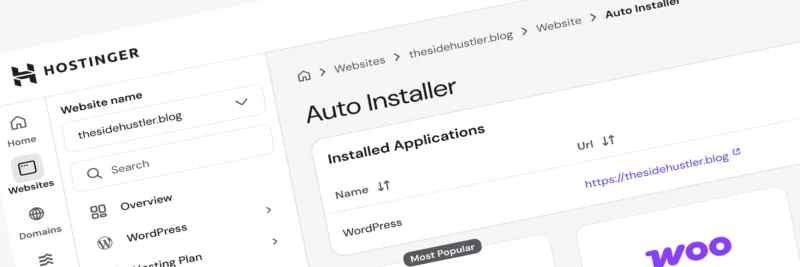
Setting up a blog shouldn’t feel like pilot training. The Hostinger hPanel is clean, modern, and removes the friction of “old-school” hosting.
The Honest Pros & Cons (What No One Tells You)
The Pros:
- LiteSpeed Edge: Pair it with the free LiteSpeed Cache plugin for instant speed gains.
- Free Migration: Their team will move your existing site for you for $0.
- Professional Email: You get free @[suspicious link removed] email, which is essential for landing sponsorships.
The Cons:
- No Phone Support: They use 24/7 Live Chat. It’s very fast (usually <3 mins), but there’s no number to call.
- 48-Month Pricing: To get the absolute lowest price ($2.99), you have to commit to 4 years. (Even at renewal, it’s half the price of SiteGround).
Which Hostinger Plan Should You Choose? (Most People Only Need This)
- Premium ($2.99/mo): This is what I suggest for 95% of people. It handles up to 100 sites and includes the free domain.
- Business ($3.99/mo): Choose this if you want Daily Backups and 5x better performance for growing sites.
- Cloud Startup ($9.99/mo): Only for when you hit 100k+ visitors a month. Don’t buy this yet.
How to Launch Your Blog on Hostinger in 10 Minutes (Step-by-Step)
The entire setup takes less than 10 minutes. You don’t need any technical experience—Hostinger walks you through everything step-by-step.
- Click here to visit Hostinger.
- Select the Premium Plan (Best Value).
- Choose your period (48 months is the biggest saver, but 12 months is fine).
- Claim your Free Domain Name.
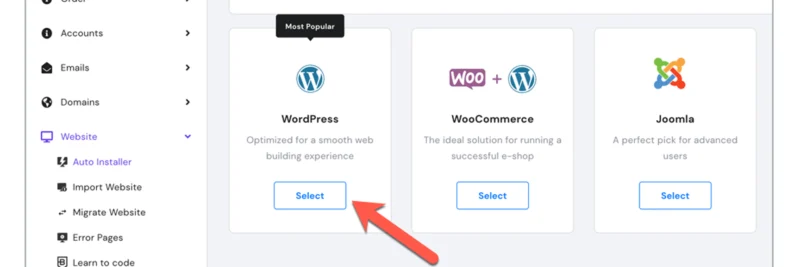
- Use the One-Click WordPress Installer.
Get your blog live with Hostinger (Free domain included) →
Final Verdict: Is Hostinger Worth It in 2026?
If you’re serious about building a blog that actually grows, your hosting isn’t something to overthink—it’s something to get right once and move on from. I moved The Side Hustler here because I wanted a host that “just works” so I could focus on writing and making money.
Common Questions About Hostinger
Is Hostinger’s $2.99 Plan Actually Worth It Long-Term?
Yes, the $2.99/mo rate is an introductory offer for the 48-month plan. It allows you to lock in the lowest overhead while you build your audience. Upon renewal, the price adjusts to $7.99/mo. Even at the full renewal rate, Hostinger remains roughly 50% cheaper than competitors like SiteGround, which often renew at $17.99/mo or higher.
Can You Move Your Blog to Hostinger Without Losing Anything?
Not at all. One of the best “hidden” features is Free Professional Migration. Once you sign up for a Hostinger plan, you simply provide your old host’s login details to their support team. They will move your entire site—database, files, and images—within 24 hours with zero downtime.
Premium vs Business Plan: Which One Should You Actually Choose?
For 95% of new bloggers, the Premium Plan is the “Sweet Spot.” It handles up to 100 websites and 25,000 monthly visitors easily. You should only consider the Business plan if you want “Daily Backups” (instead of weekly) or if you are running a heavy e-commerce store with hundreds of products.
Do You Really Own Your Domain (Or Is It a Catch)?
The domain is free for the first year of your subscription. After the first year, you will pay the standard annual registration fee (usually around $12–$15). This is standard across the industry, but Hostinger saves you that initial upfront cost so you can put that money toward your content instead.
What Happens If You Try It and Regret It? (Risk Breakdown)
Hostinger offers a 30-day money-back guarantee. If you aren’t satisfied with the speed or the interface within the first month, you can request a full refund of your hosting fees through their dashboard. There is no long-term risk if you decide to change direction.
New to Blogging? This review is part of my Complete 2026 Guide to Starting a Profitable Blog. If you haven’t set up your niche or your monetization strategy yet, head back to the main guide to see the full roadmap.Stop overthinking your hosting. Our 2026 Hostinger review shows you the exact step-by-step to get a free domain, install WordPress with one click, and satisfy Google’s Core Web Vitals from day one.
Start your blog on a fast, beginner-friendly foundation (Free domain included) →
I didn’t choose my host because it was the cheapest; I chose it because it’s the only one that doesn’t give me “tech anxiety.” Are you looking for raw speed, a safety net for when you make a mistake, or just a dashboard that doesn’t require a PhD? Let’s talk about what actually matters in the comments!
