
Table of Contents

This post contains affiliate links. If you click through and buy something, I may earn a small commission, at no extra cost to you. I only recommend tools I’ve actually used or thoroughly researched.
This Hostinger review is based on actual experience, I use Hostinger to host thesidehustler.blog, so I’m not writing this from a spec sheet.
I chose Hostinger after researching the options, mainly for the value and the tooling, and having run websites on other hosts over the years, the faster load times and cleaner dashboard stood out quickly. But I also want to be upfront about where Hostinger falls short, because no host is perfect and you deserve the full picture before you spend money.
Here’s everything you need to know.
Bottom line up front: I use Hostinger for thesidehustler.blog and I’d recommend it to any new blogger. Start here, plans from $2.69/month with a free domain and 30-day money-back guarantee. Full review below.
What Is Hostinger?
Hostinger is a web hosting company founded in 2004. It’s grown into one of the largest hosting providers in the world, serving millions of customers worldwide.
It’s best known for being affordable without being bottom-of-the-barrel cheap. That’s a harder balance to strike than it sounds, plenty of budget hosts are cheap because they cut corners on performance. Hostinger manages to keep prices low while still delivering solid speed and uptime.
For bloggers specifically, it hits a sweet spot: easy enough for complete beginners, capable enough for serious sites.
Hostinger Pricing in 2026
Let me be upfront about how Hostinger’s pricing works, because there’s a detail that catches people off guard.
The low advertised prices are intro rates for the full term paid upfront. So when you see “$2.69/month,” that’s the per-month cost when you pay for 48 months at once, around $130 upfront. When that term ends, renewal is at the standard rate.
This is completely normal in the hosting industry, Bluehost, SiteGround, and every other major host does the same thing. But I think it’s worth knowing before you sign up rather than after.
Current plans (always verify pricing at Hostinger before purchasing, promos and rates change often):
| Plan | Intro Price | Renewal Price | Websites | Storage |
|---|---|---|---|---|
| Premium | From $2.69/month | $10.99/month | 100 | 100GB SSD |
| Business | From $2.99/month | $16.99/month | 100 | 200GB SSD |
| Cloud Startup | From $7.19/month | $18.99/month | 300 | 200GB NVMe |
All plans include:
- Free domain for the first year
- Free SSL certificate
- LiteSpeed Cache (built in, no plugin needed)
- 30-day money-back guarantee
- WordPress auto-installer
- Rank Math SEO pre-installed, your SEO foundation is ready before you write a word
Which plan do you need?
For a new blog, the Premium plan is plenty. You’re not running 100 websites and you don’t need 200GB of storage when you’re just starting out. Start here, upgrade later if you need to.
The Business plan makes sense if you want daily backups included and slightly more resources. The Cloud Startup is for higher-traffic sites and is overkill for most bloggers.
Start your blog with Hostinger, Premium plan from $2.69/month, free domain included
Hostinger Performance: Speed and Uptime
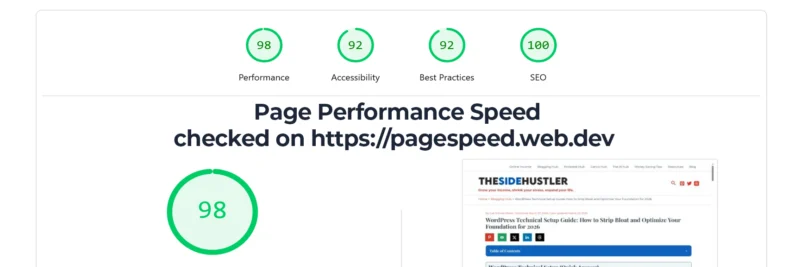
This is where it matters most. A slow host costs you search rankings and readers.
Uptime: Hostinger advertises 99.9% uptime and in my experience that holds up. I haven’t had any noticeable downtime on thesidehustler.blog. They use LiteSpeed web servers across their shared hosting plans, which are generally faster than the Apache servers most budget hosts use.
Speed: Load times are solid. Hostinger uses LiteSpeed Cache built into every plan, this is a meaningful advantage over hosts that make you install and configure a separate caching plugin. It works out of the box.
They also use SSD storage on all plans (NVMe on Cloud plans), which is faster than the older HDD storage you’ll still find on some budget hosts.
Data centers: Hostinger has data centers across Europe, North America, Asia, and South America. You can choose your data center location when you sign up, pick the one closest to most of your readers.
Is it as fast as a managed WordPress host like Kinsta or WP Engine? No. But those hosts cost $30–$35/month minimum. For the price Hostinger charges, the performance is very good.
Ease of Use: hPanel

Hostinger uses its own control panel called hPanel instead of the industry-standard cPanel. This is worth knowing upfront.
The good: hPanel is clean and well-designed. For a complete beginner, it’s easier to navigate than cPanel, everything is laid out logically and the WordPress installer is prominently placed. Setting up a site takes minutes.
The slight catch: If you’ve used cPanel before (on hosts like Bluehost or SiteGround), hPanel feels different. The terminology and layout are different enough that there’s a small learning curve. Nothing dramatic, you’ll find your way around within a day, but worth knowing if you’re coming from another host.
WordPress setup: Hostinger’s WordPress auto-installer is one of the smoothest I’ve used. You pick your domain, set your admin credentials, and it installs WordPress in a couple of minutes. No technical knowledge needed.
One thing worth knowing: Rank Math, the SEO plugin most bloggers use, comes pre-installed when you set up WordPress through Hostinger. Your SEO is ready before you’ve written a single word. Start with the free version and upgrade to Pro when you’re ready to target secondary keywords and unlock advanced reporting.
Recommended reading: How to Start a WordPress Blog on Hostinger (Step by Step)
Customer Support
Hostinger offers 24/7 live chat support. In my experience it’s responsive, I’ve had questions answered within a few minutes rather than waiting in a queue for an hour.
They don’t offer phone support, which some people find frustrating. If you strongly prefer speaking to someone on the phone, that’s a real limitation. But for most bloggers, live chat gets the job done.
Their knowledge base is also extensive. A lot of the time I’ve found the answer in their help docs before I needed to contact support at all.
Hostinger Pros and Cons
Pros:
- Very affordable entry price, even accounting for renewal rates
- LiteSpeed servers and LiteSpeed Cache built in, fast for the price
- Clean, beginner-friendly hPanel dashboard
- WordPress auto-installer makes setup easy
- Free domain and SSL included
- Rank Math SEO comes pre-installed, no plugin hunting, no setup headaches
- Reliable uptime
- Responsive live chat support
- Data centers across multiple regions
Cons:
- hPanel instead of cPanel, a small adjustment if you’re used to other hosts
- Renewal prices are significantly higher than intro prices (standard in the industry, but worth knowing)
- No phone support
- Daily backups only included on Business plan and above (Premium plan has weekly backups)
- Not the right choice if you need managed WordPress hosting
Who Is Hostinger Best For?

Hostinger is a great fit if you:
- Are starting a blog for the first time and want an affordable, easy-to-use host
- Want solid performance without paying managed WordPress hosting prices
- Are comfortable with a modest upfront cost in exchange for a low per-month rate
- Want WordPress installed and working without needing technical knowledge
Hostinger probably isn’t the right fit if you:
- Need managed WordPress hosting with automatic updates and expert WordPress support
- Prefer cPanel and don’t want to learn a new interface
- Require phone support
- Are running a high-traffic site that needs dedicated resources
How Hostinger Compares
I’ve written a full comparison if you’re deciding between Hostinger and one of the other popular options.
Recommended reading: Hostinger vs Bluehost: Which Is Better for Bloggers?
The short version: Hostinger and Bluehost are both solid budget hosts. Hostinger tends to edge out on performance and price. Bluehost has the advantage of cPanel and a longer track record in the WordPress space. Either works, but I use Hostinger.
My Honest Take
I run thesidehustler.blog on Hostinger. I’m not recommending it because the affiliate commission is good, I’m recommending it because it’s what I actually use and it does the job well.
The performance is solid. The setup process is beginner-friendly. The price is fair, especially when you factor in that the domain and SSL are included.
The renewal price increase is real and worth budgeting for. If that’s a dealbreaker, you’ll find the same pattern at every major host, it’s an industry thing, not a Hostinger thing.
For a new blogger looking for a reliable, affordable host that doesn’t require technical expertise to set up, Hostinger is where I’d point you.
Download Your Free Blog Launch Roadmap
Get the no-fluff 7-step weekend plan that takes you from blank page to live blog — free instant download.
Get started with Hostinger here, free domain, free SSL, 30-day money-back guarantee.
Recommended reading: How to Start a Blog in 2026 (Full Beginner’s Guide)
Frequently Asked Questions
Is Hostinger good for WordPress?
Yes. Hostinger has a dedicated WordPress auto-installer, LiteSpeed Cache built in for speed, and one-click WordPress updates. It’s one of the more WordPress-friendly budget hosts available. Get started with Hostinger and you’ll have WordPress running in under an hour.
Does Hostinger include a free domain?
Yes, a free domain is included for the first year on all hosting plans. After the first year, you renew the domain separately at the standard rate (typically $10 to $15/year for a .com).
Is Hostinger reliable?
In my experience, yes. They advertise 99.9% uptime and I haven’t had meaningful downtime on my blog. LiteSpeed servers are more reliable than the shared Apache setups you get from some budget hosts.
Can I move my existing blog to Hostinger?
Yes. Hostinger offers a free website migration service, they’ll move your site from your current host to Hostinger for free. You can also do it yourself using a plugin like All-in-One WP Migration.
What happens if I’m not happy?
Hostinger offers a 30-day money-back guarantee on hosting plans. If you sign up and change your mind within 30 days, you can get a refund, no questions asked.
Have a question about Hostinger that I haven’t covered? Drop it in the comments.
