
Table of Contents

This post contains affiliate links. If you click through and buy something, I may earn a small commission — at no extra cost to you. I only recommend tools I’ve actually used or thoroughly researched.
If you’re selling on Etsy, or planning to, the biggest mistake you can make is creating products based on guesswork. You spend hours designing something, list it, and then wait. And wait. And nothing happens.
The problem usually isn’t the product. It’s that nobody checked whether people were buying it before putting in the work.
That’s what Profittree is built to solve. It’s an Etsy product research and profit tracking tool that shows you demand signals pulled from real Etsy listing and sales activity, not just keyword search volume or trend graphs. You can see what’s selling, track competitors, monitor your own shop’s true profitability, and make decisions based on data instead of instinct.
If you’re still deciding what to sell on Etsy, read Best Printables to Sell for Beginners first, it gives you the product categories worth researching before you open Profittree.
In this Profittree review, I’ll walk you through exactly what it does, who it’s for, what it costs, and whether it’s worth the money at each plan level.
Quick Verdict
Profittree is one of the more useful tools available for Etsy sellers who want to research products before they create them and track real profit after they sell. The free plan is genuinely functional, not a stripped-down teaser, and the Growth plan hits the sweet spot for most active sellers.
If you’re serious about building a profitable Etsy shop and you’re currently making product decisions without data, this is worth trying. Start with the free plan here and see what your niche looks like before you spend a penny.
What Is Profittree?
Profittree is a web-based tool built specifically for Etsy sellers. It does two main things: helps you find products with proven demand before you create them, and tracks the real profitability of your shop after you start selling.
It’s a relatively new tool, but it’s built by people who clearly know the Etsy grind, and it sits in a space where demand is real. Etsy itself reports millions of active sellers on the platform, all competing for the same buyers, so anything that helps you cut through the noise with data is worth a look.
The thing that sets it apart from basic keyword research tools is that it works from real listing and sales activity, how many times a product has been viewed, added to carts, and sold in a recent window, rather than just search volume. Those sales figures are Profittree’s own estimates, not Etsy’s exact internal numbers, but they give you a far more grounded read on demand than keyword tools do.
What Does Profittree Actually Do?
Product Research: Finding What’s Already Selling
This is the core feature and the reason most people sign up.
Profittree’s Product Finder lets you search across Etsy and see which products have genuine buyer activity behind them. Instead of guessing whether something might sell, you get demand signals, estimated views, add-to-carts, and sales, that point to what’s already moving.
For anyone in the early stages of deciding what to sell on Etsy, this changes how you start. Instead of picking a niche because it feels right and hoping for the best, you can pressure-test an idea in minutes. If the data shows consistent activity, you’ve got a signal worth acting on. If it shows nothing, you move on before wasting weeks creating something nobody wants.
The Product Finder gets more powerful as you move up the plans. The free plan shows last week’s data. Starter and Growth show the last 3 days. Pro shows real-time data. For most sellers starting out, last week’s data is enough to make informed decisions, but real-time access becomes genuinely valuable once you’re managing an active shop and need to respond quickly to what’s moving.
Competitor Tracking: See How Other Listings Perform Over Time
Profittree lets you track specific Etsy listings and follow how they perform over time. You can see trends forming as they happen, compare results against your own listings, and understand what’s driving performance for the shops doing well in your niche.
This is particularly useful when you’re trying to understand why one listing outperforms another. Is it the title? The thumbnail? The price point? Watching a competitor’s listing data over time gives you real signals rather than guesses.
Real-Time Profit Tracking: What You’re Actually Earning
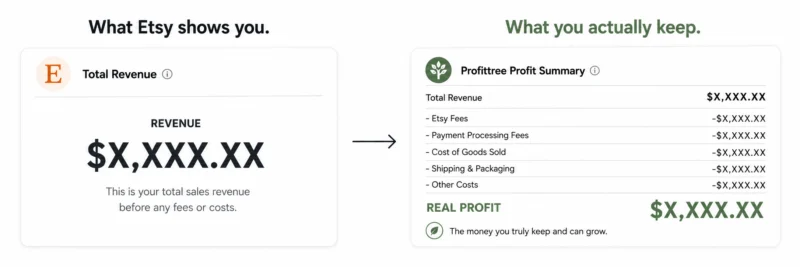
Etsy’s own dashboard shows you revenue. It does not show you profit. That’s a meaningful gap.
Profittree connects to your shop and tracks your real profit, after Etsy fees, after your costs, after everything. You add your cost of goods, and the tool does the rest. You can see profitability at the shop level, at the listing level, and at the product variant level. Because this runs on your own connected shop data, it’s the most reliable part of the tool.
For sellers who’ve been managing this in spreadsheets, or not managing it at all, this alone is worth the subscription cost. Knowing which listings are making you money, and which are generating revenue while eating your margins, is the kind of clarity that changes how you run your shop.
Listing Analytics and Advertisement Reports
Profittree tracks your listings over time and gives you detailed reports on what’s working. You can identify your best sellers, see which listings are trending, and figure out which ones are dragging performance down.
The advertisement reports, available from the Starter plan upward, show you how your Etsy ads are performing in terms of actual profit, not just clicks and impressions. That’s a more honest picture of whether your ad spend is worth it.
Print on Demand Integration
If you’re selling through Printify or Printful, Profittree integrates directly with both platforms. Every order is automatically associated with its production cost, which means your profit tracking is accurate without manual data entry. This is a feature most Etsy profit tools don’t handle well, and Profittree does it cleanly.
If print on demand is your focus, Print on Demand Side Hustle explains how that business model works alongside Etsy.
Product Variation Tracking
For sellers with multiple variants, different sizes, colors, styles, Profittree tracks which variants are selling and which aren’t. You can see performance over time and make data-driven decisions about what to keep, what to discontinue, and what to expand.
Profittree Pricing: Which Plan Is Right for You?
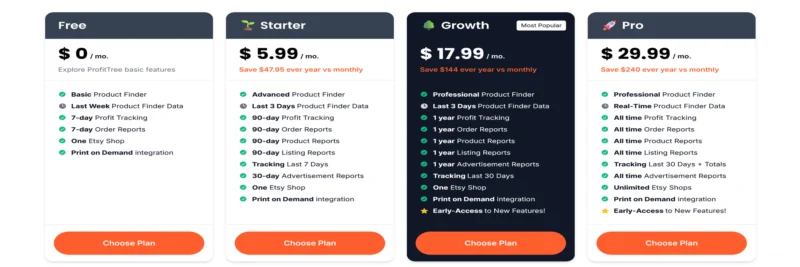
There are four plans. One thing worth flagging clearly before the breakdown: the prices below are Profittree’s annual billing rates. Monthly billing costs more, confirmed at $9.99/month for Starter if you pay month to month, rather than $5.99/month billed annually, and Growth and Pro likely follow the same pattern. Check the billing toggle on Profittree’s own pricing page before you sign up, so you know exactly which rate you’re committing to.
Free — $0/month Basic Product Finder, last week’s product data, 7-day profit tracking, 7-day order reports, one Etsy shop, Print on Demand integration.
The free plan is a real starting point. You get access to the product research tool and profit tracking, just with a shorter data window. If you’re completely new to Etsy and want to test the tool before committing, start here. It’s enough to validate a product idea and get a feel for how your shop is performing.
Starter — $5.99/month billed annually ($9.99/month if billed monthly) Advanced Product Finder, last 3 days of product data, 90-day profit tracking, 90-day order, product, and listing reports, 7-day competitor tracking, 30-day advertisement reports, one Etsy shop, Print on Demand integration.
Starter is the right entry point for sellers who are actively listing and need a longer data window to spot trends. The jump from last week’s data to last 3 days matters when you’re trying to catch demand while it’s still building. At the annual rate it’s a low-risk commitment.
Growth — $17.99/month billed annually, monthly billing is higher (Most Popular) Professional Product Finder, last 3 days of product data, 1-year profit tracking, 1-year order, product, listing, and advertisement reports, 30-day competitor tracking, one Etsy shop, Print on Demand integration, early access to new features.
This is where most active sellers land. A full year of historical data across every report type gives you a much clearer picture of your shop’s performance over time, seasonal patterns, long-term trends, which products are building momentum. The 30-day competitor tracking window is also far more useful than 7 days for identifying what’s working in a niche.
If you’re running a shop with consistent listings and want to take product research and profitability seriously, Growth is the plan to be on.
Pro — $29.99/month billed annually, monthly billing is higher Professional Product Finder, real-time product data, all-time profit tracking, all-time order, product, listing, and advertisement reports, 30-day competitor tracking with totals, unlimited Etsy shops, Print on Demand integration, early access to new features.
Pro is built for sellers managing multiple shops or those who need real-time market data to stay ahead of demand shifts. The unlimited shops feature is the main differentiator, if you run two or three Etsy shops, Pro’s cost becomes very reasonable spread across them. All-time historical data also means you’re never losing reporting context as your shop grows.
All paid plans come with annual savings versus paying monthly, Starter saves $47.95 a year, Growth saves $144, and Pro saves $240.
For reference, Etsy’s full fee breakdown is published on Etsy’s fees policy page, it’s worth reading alongside Profittree’s cost tracking to understand exactly where your money goes.
Who Profittree Is For
Profittree is a good fit if you’re an Etsy seller at any stage who wants to make decisions with data rather than instinct. That includes printables sellers trying to validate product ideas before designing, print on demand sellers who need accurate cost tracking across Printify or Printful orders, digital product sellers who want to understand which listings are profitable, and established sellers who are scaling and need competitor visibility and long-term trend data.
If you’re a printables seller specifically, it pairs naturally with the whole process in How to Sell Printables on Etsy, research the demand here, then build and list there.
It’s also worth noting that Profittree isn’t niche-specific. It works for any Etsy product category, physical products, digital downloads, print on demand, handmade goods. The product research and profit tracking features are equally useful regardless of what you sell.
Who It’s Not For
If you’re not selling on Etsy and have no plans to, Profittree isn’t for you, it’s built exclusively for the Etsy platform. It’s also not the right tool if you’re purely at the idea stage and haven’t committed to selling anything yet. The free plan exists for exactly that moment, but the paid plans are most valuable once you’re actively listing and have data to track.
What I’d Like to See Improved
No review is honest if it’s all praise. Here are the things worth knowing before you commit.
Treat the demand data as a guide, not gospel. Profittree’s product research runs on estimated sales and demand signals, not Etsy’s exact internal numbers. It’s good enough to validate a niche and spot trends, but some sellers have flagged cases where a listing showed high estimated recent sales that didn’t match what the shop was really doing. So use it to point you in the right direction, then sanity-check anything before you bet weeks of work on it. That’s true of every Etsy research tool, not just this one.
The Chrome extension is hit and miss. It’s handy for pulling data while you browse Etsy, but it’s had mixed feedback on performance, some users report it slowing their browser down. And a few longer-term users on lifetime plans have mentioned features changing over time. None of that is a dealbreaker, especially when you can test the whole thing free first, but go in with realistic expectations rather than treating the numbers as flawless.
Historical data only goes back as far as your plan allows. If you start on Free and upgrade to Growth six months in, you don’t retroactively get a year of history. If long-term tracking matters to you, it’s worth starting on the right plan from the beginning rather than upgrading later and missing the earlier data.
Competitor tracking caps at 30 days. That window on Growth and Pro is solid, but being able to follow a specific competitor listing over 90 days or more would add another layer of strategic value. That might be something they build toward.
Profittree Review: Final Verdict
If you’re selling on Etsy and making product decisions without data, Profittree directly addresses that problem. The Product Finder gives you demand signals from real listing activity, a far better starting point than pure guesswork, and the profit tracking fills the gap that Etsy’s own dashboard leaves wide open.
The free plan is a genuine starting point. Starter makes sense for sellers who are actively listing but not yet at volume. Growth is the right plan for most serious sellers. Pro is built for those running multiple shops or needing real-time market visibility.
The fact that it’s built by and for Etsy sellers comes through in how the tool is structured. It solves the real problems, what should I create, is it selling, am I making money, rather than drowning you in data you don’t need. Just remember the research data is a strong signal, not a guarantee, and you’ll get the most out of it.
Try Profittree free here and run your niche through the Product Finder before your next listing. The data alone is worth the ten minutes it takes.

