Table of Contents

This post contains affiliate links. If you click through and buy something, I may earn a small commission — at no extra cost to you. I only recommend tools I’ve actually used or thoroughly researched.
This ConvertKit review comes from a specific place: I’ve been running this blog on MailerLite, and I’m in the middle of moving my list over to Kit. So this isn’t a “I’ve used it for years and love it” review. It’s the honest research and reasoning behind a switch I’m actually making, with my own list and my own money.
The short version: for bloggers and creators who are getting serious about email in 2026, Kit is the platform I’d point you toward, and it’s the one I’m moving to. It’s not the cheapest and it’s not perfect, but it’s built for exactly what we’re doing: growing an audience, building real relationships, and turning subscribers into income. Here’s the full picture, including where MailerLite still beats it.
What Is Kit (ConvertKit)?
Kit (ConvertKit) started life as ConvertKit, built specifically for bloggers and online creators at a time when most email platforms were designed for retail businesses and corporate marketing teams. That focus hasn’t changed, it’s still very much a platform built for Kit email marketing aimed at people who sell their expertise, not their inventory.
In recent years it’s added a lot: a Creator Network for list growth, an App Store for integrations, native product selling, and a much more generous free plan. It’s grown up, but it hasn’t lost what made it good in the first place.
According to Kit’s own published data, the platform now powers over 600,000 creators worldwide, which tells you something about how well it works for this particular use case.
What Makes This ConvertKit Review Different
Most Kit reviews are written by people who’ve either used it for years or poked at it for a week. I’m in a more useful spot for you: I’m a current MailerLite user actively deciding where to put my list next. So I’ve gone deep on what Kit genuinely does better, and I’ll be straight about where MailerLite still wins, because that’s the tool I use every day. That’s the lens for everything below.
What Makes Kit (ConvertKit) Stand Out
The Creator Network
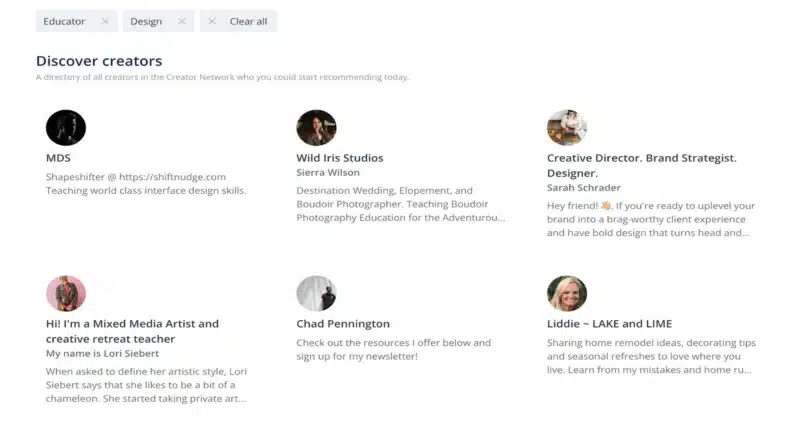
This is the feature that genuinely sets Kit apart right now, and honestly it’s one of the main reasons I’m switching.
When someone signs up to your list, Kit lets you recommend two or three other creators, and they recommend you back. It’s a mutual growth system baked directly into the sign-up process.
If you’re in a niche where other creators also use Kit, this can add real subscribers every month without spending anything on ads or grinding social media. It’s not instant magic, you need an engaged list for it to pull its weight, but from everything I’ve researched, and from what other creators in this space consistently report, it’s one of the most genuinely useful growth tools going. MailerLite has nothing equivalent, and that gap is a big part of why I’m moving.
On paid plans you can also get paid to recommend other creators’ newsletters to your new subscribers. Once your list is at a decent size, that becomes a useful income stream in itself.
Text-First Emails
Kit is built around simple, text-based emails rather than heavily designed templates. That might sound like a limitation, but it’s a deliberate choice, and a smart one.
Heavily designed HTML emails are more likely to land in the Promotions tab. Plain text emails feel personal. They feel like they came from a real person, not a marketing department. And people are more likely to open and read them.
If you want your emails to look like a glossy magazine, Kit will frustrate you. But if you want your emails to actually get read, and acted on, the text-first approach works.
Visual Automation Builder
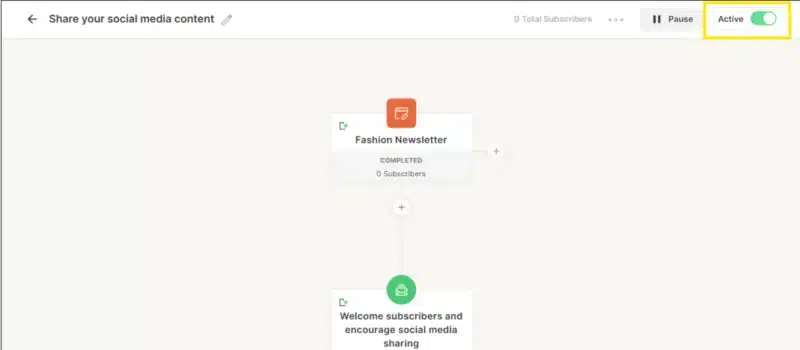
Automation is where a lot of email platforms fall apart, either too basic to be useful, or so complicated you need a tutorial just to send a welcome email.
Kit sits in a good middle ground. The visual automation builder lets you map out exactly what happens after someone signs up: which emails they get, in what order, and what triggers move them from one sequence to another.
The goal-based logic is particularly useful. If someone buys your product halfway through a sales sequence, Kit automatically skips them past the remaining sales emails. That sounds small, but it makes a real difference to the subscriber experience, and to how many people stay on your list long-term.
Tagging Instead of Lists
Most platforms charge you per subscriber per list. So if one person is on three of your lists, you pay for them three times.
Kit uses a single subscriber model with tags. One subscriber, one cost, no matter how many tags they have. You organize your audience with tags rather than separate lists, which keeps things clean and stops you paying for the same person multiple times.
It also makes targeting much more precise. You can send an email only to people tagged as interested in a specific topic, while excluding people who’ve already bought something. That kind of targeting makes a real difference to your results.
The Kit (ConvertKit) App Store
Kit has its own App Store where you can connect directly to tools like Shopify, Teachable, and Linktree, and add features like countdown timers and polls to your emails without messing around with third-party code.
It’s not the flashiest feature, but it makes Kit feel like a proper hub rather than just an email sender.
Kit (ConvertKit) Pricing in 2026
| Plan | Price | Subscribers | What’s included |
|---|---|---|---|
| Newsletter (Free) | $0 | Up to 10,000 | Unlimited emails, landing pages, 1 automation, sell products |
| Creator | From $39/mo | Scales with list | Everything free + unlimited automations, 100+ integrations, free migration |
| Creator Pro | From $79/mo | Scales with list | Everything Creator + referral system, advanced reporting, subscriber scoring |
The ConvertKit free plan is generous where it counts most for a beginner: up to 10,000 subscribers and unlimited sends, which is rare in this space. The catch, and it’s a real one, is that the free plan gives you just one automation. That’s fine for delivering a single freebie, but the moment you want a welcome sequence and a separate sales funnel running, you’re onto the paid Creator plan.
That jump to $39/month is where it gets harder to justify for smaller lists. At under 1,000 subscribers, that’s a steep cost compared to something like MailerLite. But if you need unlimited automations and you’re actively selling, it pays for itself quickly. If your list is ready for that, you can start your free Kit account here and upgrade whenever it makes sense.
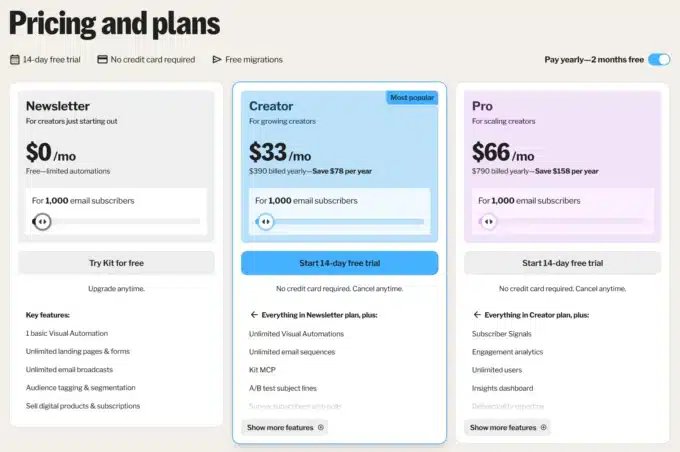
(Plans and prices shift, check the current numbers before you commit.)
What I Like About Kit (ConvertKit)
The subscriber cap on the free plan is rare. 10,000 subscribers for nothing removes the cost barrier for anyone starting out, as long as you only need one automation to begin with.
Deliverability is strong. The text-first approach means emails land in the primary inbox more often than heavily designed alternatives. That matters more than most people realize.
The Creator Network is the real differentiator. If you’re in the right niche, it adds list growth without extra effort, it’s the single feature MailerLite can’t match, and the main reason I’m making the move.
Automation logic is clean. The visual builder is easy to follow, and the goal-based logic means sequences behave intelligently rather than just firing emails in a fixed order.
You can sell products natively. No separate tool needed, you can sell digital products straight through Kit with a simple Stripe integration.
Where Kit (ConvertKit) Falls Short
One automation on the free plan. The free plan is generous on subscribers but limits you to a single automation sequence. To build proper sales funnels and welcome sequences simultaneously, you’ll need the paid plan.
Design flexibility is limited. If you want visually rich emails with columns, colors, and images, Kit (ConvertKit) isn’t the tool for you. It’s built for writers, not designers.
Pricing jumps sharply on paid plans. Once you’re on a paid tier and your list grows past 10,000 subscribers, the monthly cost climbs quickly. By 25,000 subscribers you could be paying significantly more than comparable platforms.
Analytics are basic on lower tiers. Opens and clicks are covered, but deeper data, like detailed subscriber behavior, is locked behind the Creator Pro plan.
Who Is Kit (ConvertKit) Best For?
Bloggers and content creators who want to build a genuine audience relationship. The text-first approach and Creator Network are built exactly for this.
Newsletter writers who want a clean, simple platform that handles the basics brilliantly without overcomplicating things.
Course creators and digital product sellers who want to sell directly through their email platform without separate tools.
Anyone with room to grow who wants a professional platform with serious headroom, provided one automation is enough while you’re on the free plan.
It’s probably not the best fit if you need complex visual email design, a full marketing suite with webinars and funnels built in, or if you’re a total beginner on a tight budget who wants more than one automation for free, in which case, start where I did, on MailerLite.
Kit (ConvertKit) vs the Alternatives
If you’re weighing Kit against other platforms (searching “ConvertKit vs MailerLite” is one of the most common questions I get on this), here’s the short version:
Kit vs MailerLite — MailerLite is more beginner-friendly, has a better drag-and-drop editor, and includes more automation on the free plan, which is exactly why I started there and still recommend it to beginners on a budget. Kit wins on the Creator Network and tagging system, which is why I’m moving up to it. I’ve done a proper Kit vs MailerLite comparison if you want the full breakdown.
Kit vs GetResponse — GetResponse is the stronger option if you need funnels, webinars, and a full marketing setup. Kit is better if you’re a creator focused on audience building. Read my GetResponse review for more detail.
Kit vs Beehiiv — Beehiiv is the better choice if your newsletter is the main product. Kit is stronger for bloggers who use email as a channel to support a wider content business.
You can see how the platforms compare side by side in my best email marketing tools guide.
Your First 30 Days With Kit (ConvertKit)
If you sign up, here’s a simple sequence to get moving quickly:
Day 1 — Set up the Creator Network. Add your profile and pick a few creators in your niche to recommend. This gets the growth system working from day one.
Day 2 — Create a lead magnet and set up a landing page. Kit’s built-in landing pages are clean and convert well. If you’re not sure what to offer, my guide to building your email list covers lead magnet ideas in detail.
Days 3–7 — Write and set up your welcome sequence. Five emails is enough to start: introduce yourself, share your best content, teach something useful, make a natural recommendation. My welcome email sequence guide walks through this step by step.
Day 14 — Add a link trigger to one of your emails. When someone clicks a link about a specific topic, tag them automatically. That’s the foundation of smart segmentation.
Day 30 — Review your open and click rates. See what’s resonating and adjust. By this point you should have a working system and a growing list.
Final Verdict
So, is Kit (ConvertKit) worth it in 2026? Genuinely, yes, for the right person. It’s one of the best email platforms for bloggers and creators right now. The free plan is generous on subscriber count, the Creator Network is a real differentiator, and the automation logic is clean enough to use without a manual.
Let me be straight about my own position, because it’s the whole point of this review. I started on MailerLite, and for a true beginner on a tight budget I still think MailerLite is the easier place to begin, its free plan gives you real automation for nothing. But as my list and my plans have grown, Kit is where I’m moving: for the Creator Network, the tagging, and the room to scale. If that’s your trajectory too, it’s hard to beat.
Start your free Kit (ConvertKit) account here, up to 10,000 subscribers without spending a penny.
And if you’re still getting your head around how it all fits together, start with my email marketing for beginners guide, it covers how the whole thing works before you commit to any platform.
Recommended Reading
- MailerLite Review: Is It the Right Email Tool for Bloggers?
- Kit vs MailerLite: Which Should You Choose?
- GetResponse Review 2026
- Best Email Marketing Tools for Bloggers
- How to Write a Welcome Email Sequence