Table of Contents

This post contains affiliate links. If you click through and buy something, I may earn a small commission — at no extra cost to you. I only recommend tools I’ve actually used or thoroughly researched.
Kit (ConvertKit) vs MailerLite is one of the most common decisions new bloggers face when setting up their email list. If you’ve searched “ConvertKit vs MailerLite” looking for a straight answer, here it is: it’s a real toss-up, because both are good.
I’ve used both. I started on MailerLite when I first set up my list, because it was easy to get into and free, and I still run my list on MailerLite today. I’m now in the middle of switching to Kit as my needs grow. So this isn’t a theoretical comparison: I can tell you where each one shines, where each one frustrates you, and why I’m making the move.
The honest answer is that neither is wrong. They’re built for slightly different people, and knowing which one fits your situation now could save you a migration headache later.
Recommended reading: my full email platform comparison, all four platforms side by side
Kit (ConvertKit) vs MailerLite: The Short Answer
Choose MailerLite if you’re just starting out, you want something easy to use from day one, and you don’t want to spend anything until your list is growing.
Choose Kit (ConvertKit) if you’re serious about building an audience, you want better automation and segmentation as you grow, and you want the Creator Network, Kit’s built-in list growth feature that MailerLite simply doesn’t have.
If you’re still stuck between the two after reading this, I’d lean toward Kit. It’s where I’m moving myself, not because MailerLite is bad, but because Kit has more room to grow into. More on that below.
Kit (ConvertKit) vs MailerLite: How They Compare
| Kit (ConvertKit) | MailerLite | |
|---|---|---|
| Ease of use | Easy | Very easy |
| Free plan | Up to 10,000 subscribers | Up to 250 subscribers |
| Automation (free) | 1 sequence | Up to 3 automations |
| Visual email editor | Basic | Excellent |
| Tagging and segmentation | Excellent | Basic |
| Creator Network | Yes | No |
| Sell products natively | Yes | Yes (0% commission) |
| Landing pages | Yes | Yes |
| Paid plan starts at | $39/mo | $12/mo |
Where MailerLite Wins
It’s Easier to Get Started
MailerLite has the better drag-and-drop email editor. It’s intuitive, and you can build a good-looking email in minutes without any design experience. Day to day, I can get a newsletter out quickly without wrestling with the interface.
If you want your newsletters to look polished and visual, MailerLite makes that easier than Kit does. Kit’s editor is more stripped back, built around text-first emails, which is a deliberate choice for deliverability. But if you want columns, images, and a more designed feel, MailerLite gives you more flexibility. If you’re hunting for the best email marketing tool for beginners on pure ease of use, this is usually it.
The Free Plan Includes More Automation
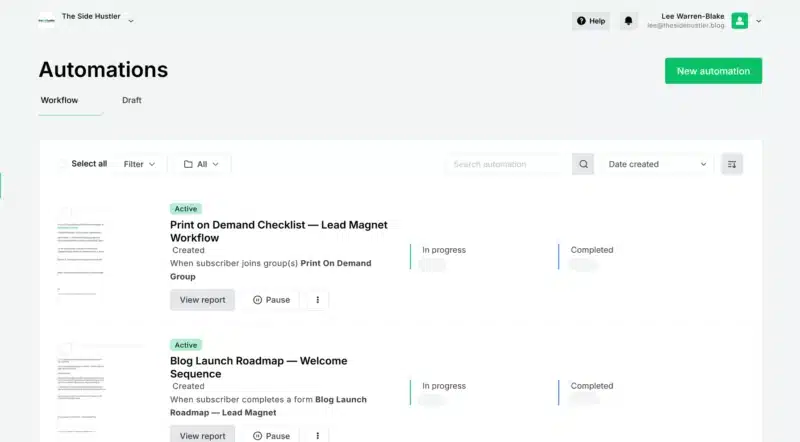
MailerLite includes automation on its free plan, which Kit doesn’t fully. On Kit’s free plan you get one automation sequence. On MailerLite’s free plan you can build up to three, a real advantage when you’re just getting started and not yet ready to pay. This is the single biggest reason I started on MailerLite and still recommend it to beginners. If you want to try it yourself, start with MailerLite’s free plan here.
It’s Cheaper on Paid Plans
MailerLite’s paid plans start at around $12/month, compared to Kit’s $39/month. If budget is tight and you’re in the early stages, that difference matters.
It’s a Complete Beginner Package
MailerLite includes landing pages, pop-up forms, a website builder, and the ability to sell digital products with no commission taken, a lot of value without spending a penny.
Where Kit (ConvertKit) Wins
The Creator Network

This is the feature that really tips it, and it’s the main reason I’m switching.
When someone joins your list through Kit, you can recommend other creators in your niche, and they recommend you back to their new subscribers. It’s a mutual growth system built directly into the sign-up process.
If you’re in a niche where other creators use Kit, this can add real subscribers every month without ads or extra effort. From everything I’ve researched, and from what other creators in this space consistently report, it’s one of the few truly useful growth tools built into a platform, and MailerLite has nothing comparable. That gap is a big part of why I’m moving up to Kit. If that’s the feature that matters most to you, you can start a free Kit account here and try the Creator Network yourself.
Better Tagging and Segmentation
MailerLite uses a list-based system. Kit uses tags. The difference might not matter at 200 subscribers, but it matters a lot at 2,000 when you’re trying to send the right message to the right people.
With Kit’s tagging you can track what each subscriber is interested in, what they’ve clicked, what they’ve bought, and automatically move them between sequences based on behavior. MailerLite’s segmentation is more basic and can get messy as your list grows.
More Generous Free Plan on Subscribers
Kit’s free plan supports up to 10,000 subscribers. MailerLite’s free plan caps at 250. If you’re growing quickly, Kit lets you go much further before you pay anything, as long as one automation is enough for now.
Automation Logic Is More Powerful
Once you’re on a paid Kit plan, the automation builder is more sophisticated than MailerLite’s. You can set goals within sequences, so if someone buys halfway through a sales sequence, Kit automatically skips them past the remaining sales emails. That behavior-based logic is hard to replicate in MailerLite without manual workarounds.
Kit (ConvertKit) vs MailerLite Pricing
Here’s the MailerLite vs Kit 2026 pricing picture, freshly checked, at different list sizes:
| Subscribers | MailerLite | Kit (ConvertKit) |
|---|---|---|
| Up to 250 | Free | Free |
| 251 to 10,000 | Paid, Comfort plan from $12/mo (scales with list size) | Free (Newsletter plan) |
| 10,000+ | Paid, Power plan from $25/mo (scales with list size) | Paid, Creator plan from $39/mo (scales with list size) |
The interesting one is 10,000 subscribers. Kit’s free Newsletter plan covers you all the way to 10k, while MailerLite would have moved you onto a paid Power plan well before then. So the pricing gap narrows a lot as your list grows. (Plans shift often, check current pricing before deciding.)
According to Influencer Marketing Hub’s email platform analysis, the true cost of an email platform includes not just subscription fees but the revenue potential of its features, which is part of why Kit’s Creator Network can justify its higher price for serious list builders.
Switching Later: Is It a Big Deal?
I’m going through this exact switch right now, so I’ll be honest about what it involves rather than pretend it’s effortless. Moving from MailerLite to Kit means rebuilding your automations, updating your signup forms across your site, and re-importing your list carefully.
It’s manageable, especially if you switch before your list gets very large, but it’s not nothing. If you already know you want Kit’s features long term, starting there saves you the hassle. And if you’re not sure yet, MailerLite is a perfectly reasonable place to begin. It’s where I started, and where I still am as I write this.
Which One Is Right for You?
Go with MailerLite if:
- You’re brand new to email marketing and want the gentlest learning curve
- You want more automation included on the free plan
- You want a visual email editor that makes your newsletters look great
- Budget is tight and you need to keep costs as low as possible early on
Go with Kit (ConvertKit) if:
- You’re serious about building an audience and want the Creator Network working for you
- You want better segmentation and automation as your list grows
- You’re planning to sell digital products or courses through your email platform
- You want to grow past 250 subscribers without paying anything
Either way, you’re not making a bad choice. Both are solid platforms used by thousands of bloggers and creators. The difference comes down to where you are right now and where you’re heading.
Want to Dig Deeper?
If you want more detail on each platform before you decide, I’ve written full reviews of both:
- Kit (ConvertKit) review: full breakdown of Kit’s features, pricing, and who it’s best for
- MailerLite review: honest look at what you get and where it falls short
And if you’re not sure email marketing is the right next step at all, my email marketing for beginners guide covers the whole picture.
You can also see how both stack up against GetResponse and Beehiiv in my best email marketing tools roundup.
Ready to get started? You can try both for free:
- Start with MailerLite for free, up to 250 subscribers, with automation included (it’s what I use)
- Start with Kit (ConvertKit) for free, up to 10,000 subscribers, Newsletter Plan