Learning how to sell digital products on Etsy in 2026 is a top-tier passive income strategy, but most sellers get stuck in the low-margin printables trap. While printables work, they are no longer the most profitable path. If you’re ready to move beyond $2 wall art and tap into high-ticket, low-competition categories that buyers are actually desperate for, here is your 2026 roadmap.
Table of Contents
This post contains affiliate links. If you click through and buy something, I may earn a small commission — at no extra cost to you. I only recommend tools I’ve actually used or thoroughly researched.
If you’ve already looked into selling printables on Etsy, you know the basics work. But printables are just one type of digital product you can sell there — and for a lot of sellers, they’re not even the most profitable one.
This post is about everything else. Canva templates, SVG cut files, PLR content packs, digital planners, spreadsheet tools — the digital product categories that often have less competition, higher price points, and buyers who are willing to pay more because they’re getting something they can actually use in their business or creative practice.
If you’re just starting out with printables, go read How to Sell Printables on Etsy first — it’s the better starting point. But if you’re ready to expand what you sell, or you want to build a digital product shop that isn’t just planners and wall art, this is where to start.
Why Etsy Works for Digital Products (Not Just Printables)
How to Sell Digital Products on Etsy
Most people think of Etsy as a handmade marketplace. But the digital products section has grown into something much bigger.
Etsy buyers search for specific, ready-to-use files. They want a social media template they can drop their logo into, an SVG they can cut on their Cricut, a budget spreadsheet that’s already built. They’re not looking for software or subscriptions — they want a file that solves a problem right now.
That’s the sweet spot. And unlike physical product sellers, your costs are minimal. You create the file once. Etsy delivers it automatically every time someone buys. No inventory, no shipping, no returns headache.
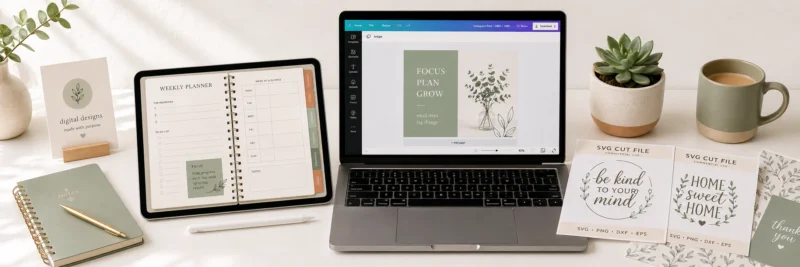
The main categories doing well beyond standard printables in 2026 are Canva templates, SVG files, PLR content, editable spreadsheets, and digital planners with interactive elements. I’ll walk through each one.
Canva Templates
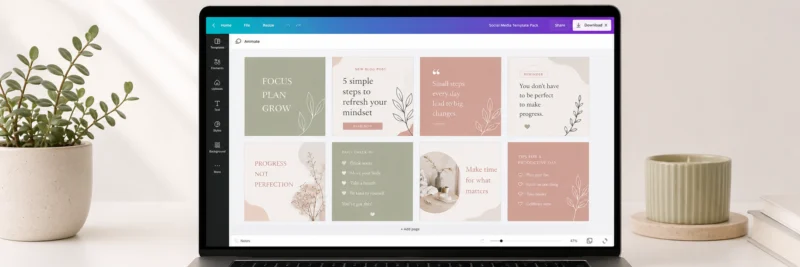
Canva templates are editable design files that buyers open in their own Canva account and customise with their own branding, text, or photos.
The demand is real. Small business owners, bloggers, coaches, and social media managers all want professional-looking graphics without hiring a designer. If you can build a clean, well-structured template in Canva, there’s a buyer for it.
What sells well:
Social media post packs (Instagram, Pinterest, Facebook), media kit templates, lead magnet and ebook templates, business card and brand kit templates, email newsletter headers, and Etsy shop banner sets.
What to know before you start:
You need a Canva Pro account to sell Canva templates properly. The reason is that Canva Pro gives you access to a shareable template link — this is what you deliver to the buyer, not a downloaded file. The buyer clicks the link, it opens in their Canva account as an editable copy, and they customise it from there.
Without Canva Pro, you can’t generate that shareable link. A free account won’t cut it for this product type.
Pricing sits higher than basic printables — expect $5 to $25 for individual templates and $15 to $75 for packs, depending on complexity and quantity.
Recommended reading: How to Sell Canva Templates on Etsy
SVG Cut Files
SVG files (Scalable Vector Graphics) are used with cutting machines like Cricut and Silhouette. Buyers use them to cut vinyl, card, fabric, and other materials to make custom products — T-shirts, tote bags, mugs, home décor, cards.
This is a completely different buyer persona from the printables market. SVG buyers are crafters. They know what they want, they search specifically, and they buy a lot — often from the same sellers repeatedly once they find designs they like.
What sells well:
Seasonal designs (Christmas, Halloween, Valentine’s Day), motivational quotes formatted for cutting, monogram frames, wedding-related designs, nursery and kids’ room designs, and niche hobby designs (sports teams, occupations, pets).
What you need:
A vector design tool. Canva can export SVGs but the quality isn’t always reliable for cutting machines. Adobe Illustrator is the industry standard, but Inkscape is free and works well for beginners. Some sellers use Affinity Designer as a middle-ground option.
Price SVGs lower than templates — $2 to $8 per individual file is standard, but bundles of 10 to 20 designs sell for $10 to $30 and often convert better.
PLR Content Packs
PLR stands for Private Label Rights. You create a content pack — a set of articles, social media captions, email sequences, journal prompts, or workbooks — and sell the rights for buyers to use, edit, and publish as their own.
The buyers are bloggers, coaches, course creators, and small business owners who need content but don’t want to write it from scratch.
This is one of the higher-effort product types to create well, but also one of the higher-margin ones. A well-researched PLR pack in a specific niche can sell for $15 to $50 or more, and buyers come back for more if the quality is there.
What sells well:
Health and wellness journal prompts, email sequence templates for coaches, social media caption packs for specific niches, blog post bundles, and self-development workbooks.
What to know:
Quality matters more here than in any other category. Buyers are going to publish this content under their name. If it’s thin, generic, or badly written, they won’t come back — and they’ll leave poor reviews. If you’re going to sell PLR, write it as carefully as you’d write your own content.
Be clear in your listing about exactly what rights are included. “Personal use only” and “PLR” mean very different things — buyers in this space know the difference and will be frustrated if the licensing isn’t explicit.
Editable Spreadsheet Templates
Google Sheets and Excel templates are an underserved category on Etsy with genuine demand and less competition than printables.
Buyers want functional tools — budget trackers that actually calculate, project planners with formulas built in, inventory trackers, habit dashboards. They’re not looking for something pretty to print. They want something that works.
What sells well:
Personal budget and debt payoff trackers, small business income and expense spreadsheets, content calendars, meal planners with automated shopping lists, freelance invoice and client trackers.
What you need:
Competence with Google Sheets or Excel formulas. You don’t need to be a developer — but you do need to know your way around IF statements, SUM ranges, and conditional formatting. If you have those skills and aren’t using them to make money, this is worth looking at.
Pricing is higher than printables because the perceived value is higher — $10 to $40 is normal for a well-built spreadsheet tool.
Deliver as a Google Sheets link (with instructions for how to make a copy) or as a downloaded Excel file. Most sellers offer both.
Digital Planners
Digital planners are PDF or GoodNotes files designed to be used on tablets — primarily iPads with an Apple Pencil. Buyers import them into apps like GoodNotes or Notability and write on them digitally.
This category has exploded over the past few years and the buyers are highly engaged. A good digital planner with hyperlinked tabs and a clean layout can sell for $10 to $30 per unit — significantly more than a standard printable planner.
What sells well:
Undated daily/weekly/monthly planners, student academic planners, goal-setting and habit planner hybrids, budget and finance planner combos, and niche planners (wedding planning, fitness, business).
What you need:
The ability to create hyperlinked PDFs with a clickable tab navigation. This is achievable in Canva Pro, Adobe InDesign, or PowerPoint — but it requires more technical setup than a basic printable. There are tutorials specifically for this on YouTube.
Test your planner on an actual iPad before listing it. What looks fine on a computer screen often has spacing or tap-target issues on a tablet that will lead to bad reviews.
How to Set Up Your Etsy Listing for Digital Products
The listing process is the same regardless of which digital product type you’re selling, but a few things matter more for non-printable products.
Be extremely clear about what the buyer receives. State the file format, the software required to use it, and any limitations. A Canva template buyer needs to know they need a Canva account. An SVG buyer needs to know which cutting machines it’s compatible with. A digital planner buyer needs to know which apps it works in.
Mockups are essential. Digital products don’t photograph themselves. You need clean mockup images that show the product in use — a tablet showing the digital planner, a Cricut cutting an SVG design, a laptop displaying the spreadsheet. Buyers need to visualise what they’re getting.
Write your listing title and tags for how buyers search. Etsy SEO for digital products works the same as for printables — use the exact phrases your buyers type into the search bar. “Canva Instagram template bundle” and “SVG cut file for Cricut Christmas” are the kind of specific phrases that convert.
Set your file delivery up properly. Upload the file directly to the Etsy listing (for downloadable files), or include a PDF with a link and instructions (for Canva template links or Google Sheets). Test the delivery process by purchasing your own listing before you go live.
When you’re ready to upload, remember that Etsy allows up to five digital files per listing with a 20MB limit—you can check the latest technical requirements in the Etsy Seller Handbook.
Recommended reading: Best Platforms to Sell Digital Products
What to Try First
If you’re new to this, don’t try to sell all five product types at once. Pick one, learn it properly, and build a small catalogue before expanding.
Canva templates are the most accessible starting point if you’re already comfortable in Canva. SVGs are worth learning if you have any vector design background. Spreadsheets are underrated if you’re analytically minded and the category is genuinely under-served on Etsy.
Whatever you pick — start with what you can actually create well. A mediocre product in a high-demand category will lose to a great product in a smaller niche every time.
And once you’ve got your first product live, read How to Scale Your Printables Business — the principles apply to every digital product type, not just printables.