Table of Contents

This post contains affiliate links. If you click through and buy something, I may earn a small commission, at no extra cost to you. I only recommend tools I’ve actually used or thoroughly researched.
Three solid tools. All regularly recommended. And no clear answer on which one to actually use.
That’s the problem with most bookkeeping software comparisons, they list the features, award some stars, and leave you exactly where you started. This post does something different. It gives you a decisive framework for choosing between QuickBooks vs FreshBooks and Wave based on your actual situation, not a generic ranking.
If you want the broader overview before going deeper here, Best Bookkeeping Software for Small Businesses covers the full picture. For the detailed FreshBooks breakdown specifically, FreshBooks Review 2026 has it. This post is the head-to-head, built around one question: which one fits you?
The Quick Answer: Before We Go Deeper
If you’re short on time, here’s the framework:
Wave: start here if you want to get going without spending anything and your needs are straightforward. Free, capable, and a solid long-term option for solo businesses with simple finances.
FreshBooks: the right choice if you send invoices regularly and want software that feels clean and professional to use. Built for freelancers and small service businesses who aren’t accountants.
QuickBooks: the one to learn if you need the most powerful tool, have a more complex business, or want to work with the widest range of bookkeeping clients. The industry standard for a reason.
The rest of this post explains the reasoning, so you can check it against your own situation and make the call with confidence.
How These Three Tools Compare: Side by Side
QuickBooks vs FreshBooks vs Wave
| Wave | FreshBooks | QuickBooks | |
|---|---|---|---|
| Price | Free (Starter) | From $19/mo | From $35/mo |
| Best for | Beginners, solo businesses | Freelancers, small service businesses | Established businesses, bookkeepers |
| Ease of use | Very easy | Very easy | Moderate |
| Invoicing | Yes | Yes, best in class | Yes |
| Expense tracking | Yes | Yes | Yes |
| Bank reconciliation | Paid plan only | Yes | Yes |
| Reporting | Basic | Solid on higher plans | Most comprehensive |
| Payroll | Paid add-on | Paid add-on | Yes (higher plans) |
| Mobile app | Yes | Yes, strong | Yes |
| Free trial | Free forever (Starter) | 30 days free | 30 days free |
| Verdict | Best free option | Best for service businesses | Best for complex needs |
Wave: Best Free Bookkeeping Software

Most free software comes with a catch, usually it’s limited enough that you’ll need to pay to get anything useful done. Wave is close to the exception, with one real caveat worth knowing upfront.
It covers a lot of what a solo business or freelance bookkeeper needs to get started: income and expense tracking, invoicing, bank connections, and basic financial reporting, all at no cost. Connect your bank account, categorize transactions as they come in, and send professional invoices directly from the platform. The one significant gap: bank reconciliation, a core bookkeeping task, now sits behind Wave’s paid Pro plan (around $16 to $19 a month), it isn’t part of the free Starter tier anymore. For a straightforward operation that doesn’t need formal reconciliation, the free plan still covers a lot.
Where it falls behind the paid alternatives: integrations with third-party tools are more limited, support response times can be slower, and payroll is a paid add-on rather than built in. None of these are dealbreakers for a solo freelancer or small business with simple finances, but worth knowing if your needs are more complex.
For freelance bookkeepers, Wave is the obvious place to build core skills before you’re inside a real client’s accounts. Free, capable, and close enough to the paid tools that most of what you learn transfers directly.
Who Should Choose Wave?
Solo business owners and freelancers who need solid bookkeeping basics without a monthly cost. Anyone who wants to start without spending anything and upgrade later if the business outgrows it. Freelance bookkeepers who want a real tool to practice in, no risk, no commitment.
FreshBooks: Best for Freelancers and Service Businesses
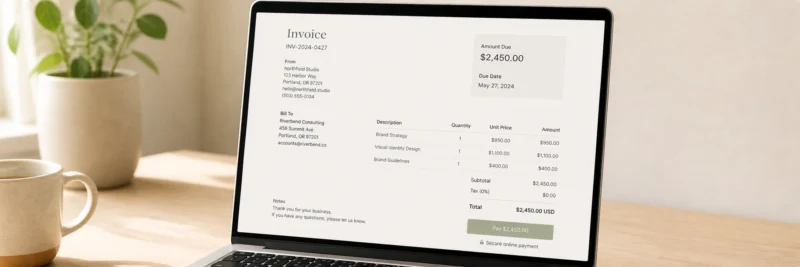
FreshBooks has a specific strength. And if that strength matches what you actually need, it’s hard to beat.
The invoicing experience is the best in this comparison. Professional templates, recurring invoices, automatic payment reminders, online payment acceptance built directly into the invoice, and a client portal where clients can view and pay without any back-and-forth. For a freelancer or service business that sends a lot of invoices, this sets FreshBooks apart from the other two.
The interface is clean and intuitive, someone with no accounting background can get up and running without a steep learning curve. Time tracking is built in and converts directly to invoices. The mobile app is one of the stronger ones in this category.
Where FreshBooks has limits: the Lite plan caps you at five active clients, most users end up needing Plus, payroll isn’t built in at any tier, and it’s less widely used by clients than QuickBooks, which matters if you’re building a bookkeeping business. For the full breakdown, FreshBooks Review 2026 covers every angle.
Try FreshBooks free for 30 days, full Plus plan access, no credit card required.
Who Should Choose FreshBooks?
Freelancers and self-employed people who invoice regularly and want the process to feel professional and painless. Consultants, designers, photographers, coaches, and other service businesses without complex payroll needs. Freelance bookkeepers whose target clients are in the creative or service space. Anyone who finds QuickBooks more than they need but wants something more polished than a free tool.
QuickBooks: Best for Established Businesses and Bookkeepers Who Want the Most Clients
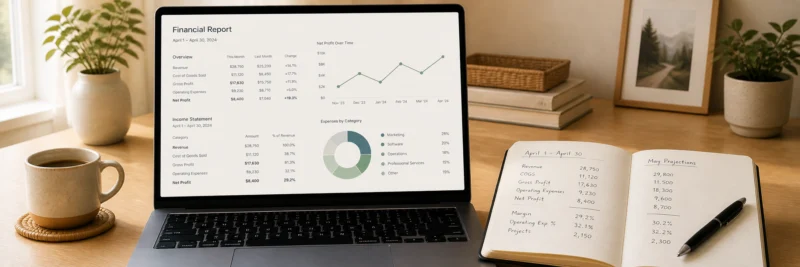
QuickBooks isn’t the easiest tool on this list. But there’s a reason it’s what most small businesses and accountants already use, and that reason matters.
The feature set is the most comprehensive of the three. Detailed financial reporting, inventory tracking, payroll on higher plans, a wide library of integrations, and the largest network of accountants and bookkeepers who work in it. For a business that’s grown beyond simple invoicing and expense tracking, multiple employees, more complex reporting, inventory to manage, QuickBooks handles it in a way Wave and FreshBooks can’t fully match.
For freelance bookkeepers, the argument is straightforward: most clients already use it. When a small business owner hires a bookkeeper, QuickBooks is the tool they’re most likely running. Knowing it well means stepping into an existing setup rather than onboarding a client to something new. That alone makes it worth learning, even if you start with Wave first.
The honest caveats: the learning curve is real, and at $35 per month to start it’s the most expensive of the three. Worth it for the right situation. Less so if your needs are genuinely simple.
Who Should Choose QuickBooks?
Established small businesses with more than a handful of employees, inventory to track, or reporting needs beyond the basics. Freelance bookkeepers who want to work with the widest possible range of clients. Anyone whose clients already use QuickBooks.
The Freelance Bookkeeper’s Decision: Which Should You Learn First?
If you’re setting up as a freelance bookkeeper, your decision criteria is different from a small business owner’s. You’re not just choosing software for your own finances, you’re choosing what to learn, and that shapes the clients you can work with.
Here’s the honest recommendation.
Start with Wave. It’s free, it covers the core workflows, categorizing transactions and producing basic reports, and builds the foundation without any financial commitment. Just remember that reconciliation itself sits behind Wave’s paid Pro plan, so you’ll want to practice that specific skill either on the paid tier or once you’ve moved into FreshBooks or QuickBooks. Spend a few weeks in it with real or practice data and you’ll have the confidence to work in any of the three tools.
Then invest time in QuickBooks. The client base it opens up is worth the effort. The skills you built in Wave transfer directly, the concepts are the same, the interface is just different. Most clients you’ll encounter will already be using QuickBooks, so knowing it well is the single biggest thing you can do to expand your options.
Add FreshBooks if your target clients are freelancers, consultants, or small service businesses. Not a replacement for QuickBooks, a complement to it.
For the full guide to becoming a bookkeeper and building a client base from scratch, How to Become a Bookkeeper in 2026 covers every step.
The Small Business Owner’s Decision: Which Is Right for Your Business?

If you’re choosing software for your own business finances, the decision is more straightforward.
Need something free? Start with Wave. It covers the basics well, costs nothing, and may be all you ever need if your finances are relatively simple.
Send a lot of invoices and want software that feels good to use? FreshBooks is the right choice. The invoicing experience is the best in this category, and the 30-day free trial means you can test it properly before paying. If you’re still in the early stages of building your business, How to Start a Freelance Business covers the bigger picture of getting a service-based income off the ground.
Have employees, need payroll, or want the most comprehensive tool? QuickBooks is worth the cost. It’s more than most solo freelancers need, but for a growing business with more complex requirements, it’s the right long-term choice.
And if you’re still building out your full setup, Best Tools for Freelancers covers the wider toolkit for running a home-based business.
Whichever one you choose, the real work is putting in consistent hours in the software until it becomes second nature.
The Decision, Made Simple
Here it is one more time, as plainly as possible.
Choose Wave if you want free, capable software and your finances are straightforward. No monthly cost, no commitment, and a genuine long-term option for simple operations.
Choose FreshBooks if you invoice regularly and want the cleanest experience in this category. Try it free for 30 days, you’ll know within a week if it’s right for you.
Choose QuickBooks if you have a more complex business, need payroll, or want to work with the widest range of bookkeeping clients. The learning curve is real, but so is the payoff.
Whichever one you go with, the free course at Bookkeepers.com is where to learn to use it properly, practical, hands-on, and built around real client work rather than just theory.
And once your software is sorted, How to Get Bookkeeping Clients (With No Experience) is the next step. Once client income starts coming in, Side Hustle Taxes 2026 covers what you’ll owe and what to set aside.