
Table of Contents

This post contains affiliate links. If you click through and buy something, I may earn a small commission — at no extra cost to you. I only recommend tools I’ve actually used or thoroughly researched.
This SEO guide for beginners will cut through the noise and give you what you need to know, not a textbook, not an agency-level deep dive, but the practical fundamentals that make a real difference for a new blog.
SEO (search engine optimization) is how Google decides which posts show up when someone searches for a topic. Get the basics right and your blog gets found. Ignore them and you’re publishing into a void.
Eight things sounds like a lot, so here’s the honest version before you read any further: most of it is habit, not skill. If you’re already writing well and writing for your reader, you’re closer to done than you think. There’s also a two-minute checklist near the bottom of this post you can run through before hitting publish on anything, so you don’t need to hold all eight points in your head at once.
I’ve been doing SEO on thesidehustler.blog for over a year. I’m not an agency and I don’t run a technical SEO consultancy. I’m a blogger who learned what works through doing it. That’s exactly the perspective this guide comes from.
Not set up yet? Get your blog live first. Hostinger, with plans from around $2.69/month on a longer plan and a free domain included. Then use this guide to make sure Google can find it.
SEO Guide for Beginners: The 8 Things That Actually Matter
1. Understand What SEO Really Is (and Isn’t)
SEO isn’t about tricking Google. It’s about making it as easy as possible for Google to understand what your content is about, and confirming that it’s useful to the reader who searched for it.
Google’s entire business model depends on surfacing the most helpful, relevant result for every search. Your job is to create content that’s the best answer to a specific question, and then signal that clearly through your structure, keywords, and links.
The good news: if you write well, write for your reader, and follow the technical basics in this guide, you’re already doing most of what matters.
According to Google’s Search documentation, the fundamentals of good SEO are creating helpful, reliable, people-first content, not gaming algorithms.
2. Install an SEO Plugin Before You Write a Single Post
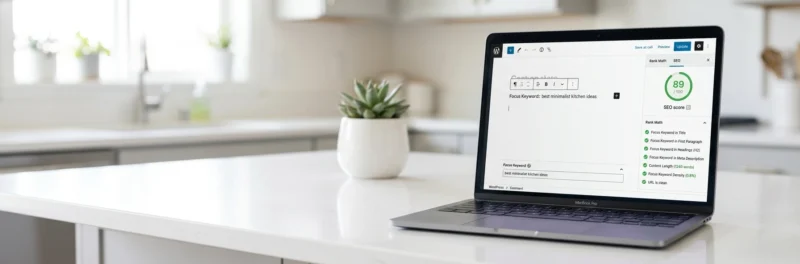
Before you publish anything, install an SEO plugin. This is the single most impactful thing a new blogger can do, it guides you through on-page SEO for every post you write, so you can’t accidentally miss the basics.
I use Rank Math on thesidehustler.blog. It scores each post against your focus keyword in real time, flags what’s missing, and shows you a green, amber, or red score. Aim for green before you publish.
Rank Math checks:
- Is your focus keyword in the title?
- Is it in the first sentence?
- Is it in at least one H2 subheading?
- Does your meta description contain the exact keyword?
- Do you have internal and external links?
- Is your content long enough?
All of that happens automatically as you write, one of the more reliable seo tips for beginner bloggers: let the plugin do the remembering, not your memory. Install it on day one and use it on every post.
Recommended reading: Rank Math Setup Guide: How to Configure It for Your Blog
3. Do Keyword Research Before You Write
Keyword research is how you find out what people are searching for, so you can write posts that answer real questions, not just topics you assume people care about.
How it works:
A keyword is a phrase someone types into Google. “How to start a blog” is a keyword. “Blog tips” is too vague to be useful. The more specific, the better, specific keywords have clearer intent and less competition.
Free keyword research methods:
- Google autocomplete: start typing your topic into Google and see what it suggests. Every suggestion is a real search people make.
- People Also Ask: the question boxes in Google search results. Every question there is a post idea.
- Related searches: scroll to the bottom of a Google results page. The related searches show you what people look for after their initial search.
- Google Search Console: once your blog is indexed, this shows you exactly which searches are finding your posts. Free, directly from Google, essential.
What to look for in a keyword:
- Enough search volume that people are searching for it
- Clear intent, you can tell exactly what the reader wants
- Competition you can realistically compete with as a new blog
Recommended reading: Best Keyword Research Tools for Bloggers
4. Place Your Keyword in the Right Places

Once you have your focus keyword, it needs to appear in specific places for both Rank Math and Google to recognize your post as being about that topic. This is the core of how to optimize blog posts for SEO, and it’s largely mechanical once you know the list.
Mandatory keyword placements:
- Title (H1): include the focus keyword, ideally near the start
- First sentence: not the first paragraph, the very first sentence
- At least one H2 subheading: naturally, not forced
- Meta description: the exact keyword phrase, same words, same order, 150–160 characters
- Hero image alt text: describe the image naturally, include the keyword where it fits
- URL slug: keep it short, include the keyword, no stop words
What to avoid:
Keyword stuffing: repeating the keyword so often it reads unnaturally. Aim for the keyword to appear 4–6 times per 1,000 words. If it feels forced, it probably is. Write for the reader first, then check the keyword placement.
5. Structure Your Posts for Scannability
Google reads your post structure. So do your readers. A well-structured post is easier for both to understand, which means better rankings and lower bounce rates.
Post structure basics:
- One H1: your post title. WordPress sets this automatically.
- H2 for main sections: break your post into clear chunks. Every H2 should be descriptive enough to stand alone.
- H3 for subsections: use these within an H2 section when you need to break down a point further.
- Short paragraphs: two to three sentences maximum. White space helps readability and keeps readers on the page.
- Bullet points and numbered lists: use these when listing genuinely works better than prose. Don’t use them as padding.
Every post should have a clear intro, logically ordered body sections, and a conclusion with a next step. That structure makes it easy for Google to understand what the post covers, and easy for readers to get value from it quickly.
6. Build Internal Links Throughout Your Blog
Internal links connect your posts to each other. They serve two purposes: they help readers navigate to related content, and they help Google understand the structure and hierarchy of your site.
A blog with strong internal linking tells Google which posts are most important (the ones that get linked to most often) and how topics relate to each other.
Internal linking rules:
- Every post should contain at least 3–6 links to other relevant posts on your blog
- Use descriptive anchor text, “read my guide to keyword research” is better than “click here”
- Use “Recommended reading” links inline within content, not just at the bottom
- Link to your pillar posts frequently, this signals their importance to Google
The pillar post / cluster model is the most effective internal linking structure for bloggers. One comprehensive pillar post covers the main topic, and multiple supporting posts link back to it.
Recommended reading: How to Build Topic Clusters for Your Blog
7. Add External Links to Authoritative Sources

Linking out to authoritative external sources, official documentation, research papers, established websites in your niche, signals to Google that your content is trustworthy and well-researched.
Rank Math specifically flags missing outbound links as an SEO issue. Include at least one or two external links per post, pointing to useful sources for your reader.
Good external link targets:
- Official platform pages (WordPress.org, Google’s documentation, government sites)
- Established authoritative blogs in your niche
- Research or data sources that back up claims you make
Don’t add external links just to tick the box. Link to things your reader would find useful as a next step or reference.
8. Set Up Google Search Console and Submit Your Sitemap
Google Search Console is a free tool from Google that shows you how your blog appears in search results, which keywords you rank for, how many clicks you get, and whether Google has found any technical issues with your site.
It also lets you submit your sitemap, a file that lists all your posts and pages, so Google can find and index your content faster.
How to get started:
- Go to Google Search Console and add your site as a property
- Verify ownership: if you’re using Rank Math, it handles the verification code automatically
- Go to Sitemaps and submit your sitemap URL: yoursite.com/sitemap_index.xml
- Rank Math generates and maintains your sitemap automatically
Check Search Console monthly at minimum. It’s the most direct feedback you’ll get from Google about your site’s performance.
Recommended reading: How to Get New Blog Posts Indexed Fast
What SEO Won’t Do for You
SEO is not a quick-win strategy. New blogs take time to build domain authority, typically 6–12 months before Google starts ranking posts competitively for their target keywords.
That’s not a reason to skip SEO. It’s a reason to start doing it correctly from day one, so that when Google does start paying attention to your site, it finds everything in order.
The blogs that give up at month three never find out what month twelve looks like.
In the meantime, Pinterest is worth investing in alongside SEO. It can drive meaningful traffic to a new blog much faster than Google, and that early traffic helps validate your content and build your email list while the SEO compounds.
If you haven’t got your blog set up yet, start with Hostinger: free domain, WordPress installed in minutes, and you’ll be ready to apply everything in this guide from day one.
A Simple SEO Checklist for Every Post
Before you hit publish on any post, run through this:
- Focus keyword in the title
- Focus keyword in the first sentence
- Focus keyword in at least one H2
- Meta description written with exact focus keyword: 150–160 characters
- Hero image has descriptive alt text including the keyword
- At least 2 external links to authoritative sources
- At least 3–6 internal links to related posts
- Post is a minimum of 1,500 words for informational content
- Rank Math score is green
Download Your Free Blog Launch Roadmap
Get the no-fluff 7-step weekend plan that takes you from blank page to live blog — free instant download.
Get Rank Math here and let it walk you through this automatically on every post.
Recommended reading:
- On-Page SEO Checklist for Bloggers: 25 Things to Check Before You Hit Publish
- Blog Analytics for Beginners: 7 Key Metrics and a Simple Guide to Understanding Your Numbers
- How to Start a Blog in 2026 (Simple Step-by-Step Guide for Beginners)
Have a specific SEO question about your blog? Drop it in the comments, I’ll do my best to help.

Pingback: Build a Digital Product Business with ChatGPT, Midjourney, and Canva – Sky Forbes