
Table of Contents

This post contains affiliate links. If you click through and buy something, I may earn a small commission — at no extra cost to you. I only recommend tools I’ve actually used or thoroughly researched.
If you want to promote your blog on Pinterest, here’s the good news: it’s one of the fastest ways to get a brand-new blog in front of real readers. If you’re writing posts that nobody’s reading right now, this might be the quickest fix you’ve got.
I know that sounds like a bold claim. But Pinterest is one of the few platforms where a brand new blog can start getting consistent traffic within months, without an existing audience, without paid ads, and without posting every single day.
The catch is that most bloggers use Pinterest wrong. They pin randomly, ignore their keywords, use the wrong image sizes, and then conclude that Pinterest doesn’t work. It does work. It just needs to be done properly.
This guide covers exactly how to promote your blog on Pinterest, from setting up your account the right way through to building a pinning routine that drives real, sustained traffic.
Recommended reading: Pinterest for Bloggers: How to Get Free Traffic in 2026

Why You Should Choose to Promote Your Blog on Pinterest
Before we get into the how, it’s worth being clear on why Pinterest deserves a place in your blog promotion plan. Using Pinterest to grow your blog isn’t complicated, it just takes doing a few things consistently that most people skip.
Most traffic sources for bloggers are either slow (Google SEO), expensive (paid ads), or exhausting (social media). Pinterest sits in a different category entirely.
It’s a search engine, which means people come to it with intent, they’re looking for something specific, not just scrolling for entertainment. When your content shows up in those searches, the reader is already interested in what you wrote about before they even click.
It’s also one of the few platforms where old content stays relevant. A blog post you wrote six months ago can suddenly start getting Pinterest traffic today if someone creates a new pin for it or if Pinterest starts surfacing it to a new audience. That compound effect is what makes Pinterest so valuable for bloggers long-term.
Pinterest reported 640 million monthly active users in its Q2 2026 results, a new record, and the large majority of top searches are unbranded, meaning people are searching for ideas and solutions, not specific brands. For bloggers, that’s an enormous pool of potential readers actively looking for content like yours.
Free Pinterest Training Workshop
Content ideas are only useful if your Pinterest strategy is solid enough to make them work. Meagan Williamson’s free workshop — The Discovery Loop — covers the full system so your content gets found.
Step 1: Make Sure Your Pinterest Account Is Set Up for a Blog
Promoting a blog on Pinterest starts with having the right foundation. If your account isn’t set up properly, everything else you do will underperform.
The non-negotiables:
Switch to a business account. Free, unlocks analytics, and tells Pinterest you’re a serious content creator. If you’re still on a personal account, switch today.
Claim your website. This links your domain to your Pinterest account and gives your content priority in distribution. Pinterest consistently gives more reach to pins from verified domains.
Write a keyword-rich profile bio. Describe what your blog is about using the words your readers would actually search for. Be specific. “Helping beginner bloggers build traffic and income through Pinterest and email marketing” does more work than anything vague.
Set up 10–15 focused boards. Each board should cover one specific topic related to your blog. Use keyword-rich titles and write proper descriptions for every board.
Full setup guide: How to Set Up a Pinterest Business Account
Step 2: Do Your Keyword Research Before You Create a Single Pin
The biggest mistake bloggers make when promoting on Pinterest is skipping keyword research. They design a pin, upload it, write a vague title, and wonder why nobody finds it.
Pinterest is a search engine. Keywords are how it matches your content with the people searching for it. Without them, your pins are invisible.
The good news is that keyword research on Pinterest is straightforward. Open Pinterest, type your blog post topic into the search bar, and watch the autocomplete suggestions. Those suggestions are real searches from real users, they’re telling you exactly how your audience looks for content like yours.
Use those keywords in:
- Your pin title
- Your pin description
- Your board title and description
- Your profile bio
- The alt text on images you add to your blog posts
Consistency is what makes Pinterest SEO work, and it’s really the foundation of pinterest marketing for bloggers: consistent signals, not clever tricks. The more clearly and consistently your account signals what it’s about, the faster Pinterest figures out who your audience is.
Full guide: Pinterest Keyword Research
Step 3: Create Pins That Are Worth Clicking
Your pin image is your blog post’s first impression on Pinterest. Get it wrong and nothing else matters, the reader scrolls past and never knows your content exists.
The basics of a pin that gets clicked:
- Vertical format: 1000 x 1500 pixels. Pinterest is built for vertical content. Anything else gets cropped or displayed awkwardly.
- Clear text overlay. Tell the reader exactly what they’ll get if they click. Be specific. “How to Start a Pinterest Business Account in 10 Minutes” outperforms “Pinterest Tips” every single time.
- High contrast design. Your text needs to be immediately readable, light text on dark backgrounds, dark text on light. If you have to squint, the design isn’t working.
- Consistent branding. Use the same fonts and colors across your pins so your content becomes recognizable over time.
Canva is the tool I’d point you to for this. The free version has Pinterest templates built in, you don’t need design skills or expensive software. Create 3–5 different pin designs for each blog post so you have multiple chances to get traction.
Full guide: Pinterest Pin Design
Step 4: Set Your Blog Posts Up for Pinterest
Promoting your blog on Pinterest isn’t just about what you do on Pinterest, it’s also about how your blog posts are set up to be shared.
A few things that make a real difference:
Add at least one vertical pin image inside your post. When readers are on your blog and want to save your content to Pinterest, they need a pin-ready image to save. A vertical image with text overlay embedded in the post makes it effortless for them.
Add a Pin It button. There are WordPress plugins that add a hover Pin It button to your images. It’s a small addition that meaningfully increases organic saves from your blog traffic.
Write titles that translate to Pinterest. Some blog post titles work perfectly as pin headlines. Others need adapting. When you create your pins, think about how a Pinterest searcher would phrase the question your post answers, and write your pin title around that.
Make your blog fast and mobile-friendly. Pinterest traffic is predominantly mobile. If your blog loads slowly or looks broken on a phone, you’ll lose readers the moment they click through, and Pinterest will notice the high bounce rate.
Step 5: Pin Consistently Every Day
Consistency is the single most important factor in how well Pinterest promotes your blog. It matters more than the quality of your pin designs, more than your keyword research, more than anything else.
Pinterest rewards accounts that show up every day with fresh content. An account that pins 5 times a day consistently will outperform one that pins 50 times on one day and then disappears for a week, every single time.
The practical solution is scheduling. You don’t need to be on Pinterest every day, you just need your pins to go out every day. Batch your pin creation once a week and let a scheduler post them for you.
When I was building my Pinterest presence I started with Tailwind, and it made staying consistent a lot easier, you batch everything in one sitting and the queue runs on its own. I still dip into it now and then. These days, though, I mostly use Buffer, because it lets me handle my other social platforms from the same calendar. For anyone starting out, either one takes the daily pressure off, pick the one that fits the rest of your setup.
Full guide: How to Schedule Pinterest Pins in 2026

Step 6: Use Pinterest to Build Your Email List
This is the step most bloggers overlook, and it’s one of the highest-value things you can do with Pinterest traffic.
Pinterest readers arrive with intent. They searched for something specific and found your content. That’s a warm audience, and warm audiences convert to email subscribers at a much higher rate than cold traffic.
The strategy is simple:
- Create pins that lead to your best lead magnet posts or landing pages
- Make sure those pages have a clear, compelling opt-in offer
- Let Pinterest drive the traffic and your email sequence do the rest
Pinterest traffic that becomes an email subscriber is worth far more than Pinterest traffic that just reads a post and leaves. Building this loop into your Pinterest strategy from the start makes your whole blog promotion effort more valuable.
Full guide: How to Build Your Email List From Pinterest
Step 7: Check What’s Working and Adjust
Once you’ve been promoting your blog on Pinterest for a few weeks, your analytics will start telling you something useful.
If you’re tracking pinterest blog traffic specifically, the number that matters most for blog promotion is outbound clicks, how many people clicked your pin and landed on your blog. Not impressions, not saves, clicks.
Look at your top-performing pins every month and ask: what do they have in common? What topic, what design style, what type of headline? Then create more content like that.
Look at your underperformers and ask: is the design weak? Is the title too vague? Is the board it’s saved to poorly targeted? Small adjustments often make a real difference.
Full guide: Pinterest Analytics Guide
How Long Until Pinterest Promotes Your Blog Effectively?
The honest answer is 60–90 days of consistent effort before you start seeing meaningful traffic. The first month is slow, Pinterest is building up a picture of your account and your audience. Traffic trickles in.
By month two and three, things start to compound. Pins from month one are still getting found. New pins build on the account authority you’ve been accumulating. The floor gets higher.
In my own experience, I had a little traffic in the first month, nothing major, and it built through that month and into the second. It was slow going at first, with random-feeling spikes and dips while Pinterest worked out who my audience was. That’s normal. The real growth came over the months that followed.
Give it three months of consistent effort and you’ll have enough data to know whether it’s working, and enough momentum for it to keep growing.
A Simple Pinterest Blog Promotion Checklist
Use this to make sure you’ve covered the basics:
- Pinterest business account set up and website claimed
- Profile bio written with keywords
- 10–15 keyword-rich boards created
- 3–5 pin designs created per blog post
- Pins scheduled consistently (3–5 per day)
- Vertical pin image added to each blog post
- Pin It button installed on blog
- Pinterest Analytics reviewed monthly
- Pinterest referral traffic checked in Google Analytics
Free Pinterest Training Workshop
Content ideas are only useful if your Pinterest strategy is solid enough to make them work. Meagan Williamson’s free workshop — The Discovery Loop — covers the full system so your content gets found.
Final Thoughts
Promoting your blog on Pinterest takes patience. The results don’t come in week one. But the traffic that comes from Pinterest is some of the best traffic a blog can get: high intent, genuinely interested, and surprisingly durable.
Set up your account properly, do your keyword research, create good pins, and show up consistently. Do that for three months and Pinterest starts working for you in a way that compounds over time.
Most bloggers quit before they get there. Don’t be one of them.
Next step: Pinterest Affiliate Marketing
Promoting your blog on Pinterest comes down to a handful of habits done consistently. I’ve put them on one page, grab the free Pinterest Starter Checklist below and work down it this week.
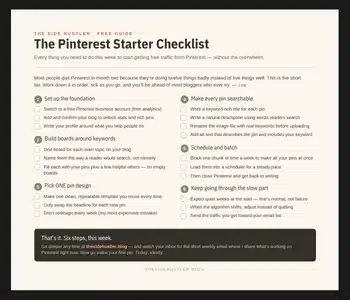
Download Your Free Pinterest Starter Checklist
Grab the free one-page checklist that shows you exactly what to do first, next, and after that.

Pingback: How to Start a Blog in 2025 (Beginner’s Guide) – Sky Forbes