
Table of Contents

This post contains affiliate links. If you click through and buy something, I may earn a small commission — at no extra cost to you. I only recommend tools I’ve actually used or thoroughly researched.
Most bloggers set up Pinterest, start pinning, and then either ignore their analytics completely or stare at the numbers without knowing what any of it means.
Both are a problem. Flying blind means you can’t improve. Drowning in metrics you don’t understand leads to the same place.
Pinterest analytics don’t need to be complicated. You’re really just trying to answer three questions: what’s getting found, what’s getting clicked, and what’s sending people to your blog. Everything else is noise.
This guide cuts through that noise and shows you exactly what to look at, what it means, and what to do with it.
Recommended reading: Pinterest Strategy for Beginners
Why Pinterest Analytics Matter for Bloggers
Pinterest analytics are the feedback loop that tells you whether your strategy is working. Without them, you’re guessing.
With them, you can see which topics your audience responds to, which pin designs get clicked, which boards are driving traffic, and how much of your blog traffic is coming from Pinterest.
That information is really useful, but only if you look at it regularly and use it to make decisions. Checking your analytics once and never going back is almost as useless as not checking them at all.
The goal is a simple monthly habit: look at the numbers, spot what’s working, do more of that. Spot what’s consistently underperforming, adjust it. That’s the whole system.
According to Pinterest’s business resources, pins have a much longer lifespan than content on other platforms, which means your analytics will often show you pins gaining traction weeks or months after you created them. Understanding this is key to reading your data correctly.
Free Pinterest Training Workshop
Content ideas are only useful if your Pinterest strategy is solid enough to make them work. Meagan Williamson’s free workshop — The Discovery Loop — covers the full system so your content gets found.
How to Access Pinterest Analytics
You need a Pinterest business account to access analytics. If you’re still on a personal account, switch now, it’s free and takes five minutes.
Recommended reading: How to Set Up a Pinterest Business Account
Once you have a business account:
- Log into Pinterest
- Click the analytics icon in the top left menu, it looks like a bar chart
- Select Overview to see your top-level numbers
That’s your analytics dashboard. Everything we’re going to cover lives in here.
The Pinterest Analytics Metrics That Actually Matter
Pinterest gives you a lot of numbers. Most of them are interesting but not essential. Here are the ones that tell you something useful.
Impressions
What it is: The number of times your pins appeared on someone’s screen, in their home feed, in search results, or on a board.
What it tells you: Reach. How many people are seeing your content.
What it doesn’t tell you: Whether anyone cared. A pin can have millions of impressions and zero clicks if the design or title isn’t compelling enough to stop the scroll.
Impressions are a vanity metric if you look at them in isolation. They matter when you compare them to your engagement rate, how many of those impressions turned into clicks or saves.
Saves
What it is: The number of times someone saved your pin to one of their boards.
What it tells you: That someone found your content valuable enough to want to come back to it. Saves are a strong positive signal to Pinterest’s algorithm, they tell Pinterest that your pin is resonating with the audience it was shown to.
What it doesn’t tell you: Whether they ever clicked through to your blog. Saves are great for distribution, but they don’t directly drive blog traffic.
Clicks (Outbound Clicks)
What it is: The number of times someone clicked your pin and landed on your blog.
What it tells you: This is the metric that matters most for bloggers. Clicks are actual visitors to your website. Everything else is a stepping stone to this number.
Watch your outbound clicks closely. A pin with high impressions and saves but low clicks tells you that people like the image but the title or landing page isn’t compelling enough to follow through. A pin with relatively low impressions but high clicks tells you it’s highly relevant to the people seeing it, a very good sign.
Click-Through Rate (CTR)
What it is: The percentage of impressions that result in a click. Calculated as clicks divided by impressions.
What it tells you: How well your pin converts viewers into visitors. A higher CTR means your pin design, title, and description are doing a good job of convincing people to click.
Pinterest doesn’t display CTR as a standalone metric, you calculate it yourself by dividing outbound clicks by impressions. It’s worth doing for your top-performing pins to understand what’s working.
Engaged Audience
What it is: The number of unique people who have interacted with your pins, through saves, clicks, or close-ups, in a given period.
What it tells you: How many real people are engaging with your content, not just seeing it. This is a more meaningful measure of audience engagement than raw impressions.
How to Use Pinterest Analytics to Improve Your Strategy
Numbers are only useful if you act on them. Here’s how to turn your analytics into decisions.
Find Your Best-Performing Pins
Go to Analytics > Top Pins and sort by outbound clicks. These are the pins driving real traffic to your blog.
Look at them carefully:
- What topic is the pin about?
- What does the design look like?
- What’s the headline?
- Which board is it saved to?
Your best-performing pins are telling you what your audience wants. Create more content on those topics. Design more pins in that style. Use similar headlines.
This is the simplest and most effective thing you can do with your analytics.
Find Your Underperforming Pins
Look at pins with high impressions but low clicks. These are pins that are getting in front of people but not converting them into visitors.
Ask yourself:
- Is the design compelling enough?
- Is the headline specific and benefit-driven?
- Does the pin clearly communicate what the reader will get?
Often the fix is simple, a stronger headline or a cleaner design. Create a fresh version of the pin with these improvements and see if it performs better.
Identify Your Best-Performing Boards
Go to Analytics > Top Boards and look at which boards are driving the most engagement and clicks. These are the topics your audience is most interested in.
If certain boards are consistently outperforming others, consider creating more content in those areas. If a board is consistently getting very little engagement, look at whether the board description is keyword-rich and whether the content in it is strong.

Track Seasonal Trends
Pinterest is a seasonal platform. Certain topics spike at predictable times of year, gift ideas in November, fitness content in January, travel planning in spring. Your analytics will show you these patterns over time.
Use this information to plan your content calendar. If a certain type of content spiked last October, start creating and scheduling pins for similar content in September this year, before the search volume peaks, not after.
Cross-Check With Google Analytics
Pinterest Analytics tells you what’s happening on Pinterest. Google Analytics (or your blog’s analytics tool) tells you what’s happening on your blog. Cross-checking the two gives you the full picture.
In Google Analytics, go to Acquisition > Traffic Sources and look at how much referral traffic is coming from Pinterest. Compare this to what Pinterest Analytics is telling you about clicks.
If the numbers don’t match up, Pinterest says you’re getting more clicks than Google Analytics shows arriving from Pinterest, it can point to tracking issues or users who are clicking but bouncing immediately. Both are worth investigating.
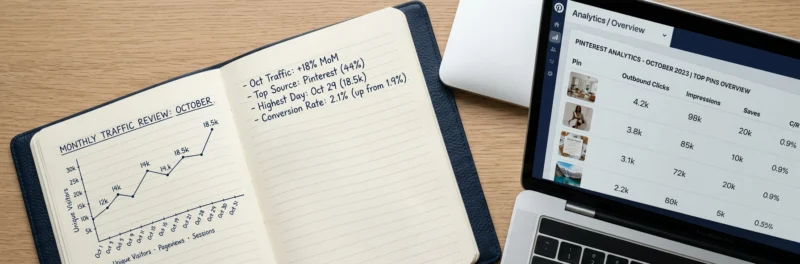
Setting Up a Simple Monthly Analytics Review
You don’t need to check your Pinterest analytics every day. A simple monthly review is enough to stay on top of what’s working and make informed decisions.
This is the routine I keep myself, I’m not in the dashboard every day. A focused look once a month is enough to spot the pattern and adjust from there.
Here’s a 30-minute monthly routine that covers everything:
Week 1 of the month (30 minutes):
- Open Pinterest Analytics and set the date range to the previous month
- Note your overall impressions, saves, and outbound clicks, are they up or down from the month before?
- Go to Top Pins sorted by outbound clicks, screenshot or note the top 5
- Go to Top Boards, note which boards are driving the most engagement
- Open Google Analytics and check Pinterest referral traffic for the same period
- Write down 2–3 things to do differently this month based on what you’ve found
That’s it. 30 minutes, once a month, and you have everything you need to keep improving.
Pinterest Analytics for New Accounts: What to Expect
If you’ve just started on Pinterest, your analytics will look pretty quiet for the first few weeks. That’s normal, don’t panic.
Pinterest takes time to understand your account and your audience. In the early months you’ll see:
- Impressions gradually increasing as Pinterest starts distributing your pins
- Spikes and dips that feel random, they’re Pinterest testing your content against different audiences
- Some pins taking off while others sit dormant, this is normal and gives you useful data about what resonates
The numbers that matter most in the early stages are saves and outbound clicks, not impressions. Even a small number of clicks in month one is a positive signal that your content is reaching the right people.
Give it three to six months of consistent pinning before drawing any firm conclusions from your analytics. Pinterest traffic compounds over time, your month six numbers will look very different from your month one numbers if you’ve been consistent.
Tools That Help You Go Deeper on Pinterest Analytics
Pinterest’s built-in analytics are solid for most bloggers and cover everything in this guide. But if you want to go further, a couple of tools are worth knowing about.
Tailwind, alongside its scheduling features, Tailwind provides extra analytics on your pin performance, including engagement rates and best-performing content over time. Useful if you want more detail than Pinterest’s native analytics provide.
Google Analytics, essential for understanding how Pinterest traffic behaves on your blog. Do Pinterest visitors read multiple pages? Do they sign up to your email list? Do they bounce immediately? Google Analytics answers these questions.
If you want to understand the full picture of how Pinterest fits into your marketing, not just the numbers but the strategy behind them, Meagan Williamson’s free Pinterest workshop covers how to build a Pinterest system that drives real results. It’s free and worth an hour of your time.
Free Pinterest Training Workshop
Content ideas are only useful if your Pinterest strategy is solid enough to make them work. Meagan Williamson’s free workshop — The Discovery Loop — covers the full system so your content gets found.
Final Thoughts
Pinterest analytics aren’t complicated once you know what to look at. Focus on outbound clicks above everything else, that’s the number that tells you whether Pinterest is sending people to your blog.
Check your numbers monthly, act on what you find, and keep showing up consistently. The bloggers who get the best results from Pinterest aren’t the ones obsessing over their analytics daily, they’re the ones who check in regularly, make small adjustments, and keep going.
Next step: How to Promote Your Blog on Pinterest
Analytics tell you what’s working. The free Pinterest Starter Checklist below makes sure you’re doing the things worth measuring in the first place, your whole first week, on one page. Grab it and watch the numbers start to mean something.
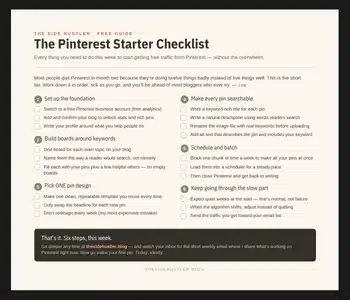
Download Your Free Pinterest Starter Checklist
Grab the free one-page checklist that shows you exactly what to do first, next, and after that.
