
Table of Contents
This post contains affiliate links. If you click through and buy something, I may earn a small commission — at no extra cost to you. I only recommend tools I’ve actually used or thoroughly researched.
Learning how to build an email list from Pinterest is the difference between traffic that disappears and readers you keep for good. Pinterest can send you a steady stream of visitors, but a visitor who reads one post and leaves is gone forever, unless you catch their email first. This is the simple path I use to do exactly that.
There’s nothing clever about it, four simple steps, and once it’s set up it runs on its own. Let me walk you through exactly how it works.
Why Email Subscribers Beat Pinterest Pin Clicks Every Time
Pinterest traffic isn’t yours. The algorithm gives it and the algorithm can take it away, and it will, every time the rules shift. I’ve watched my own numbers wobble more than once when Pinterest changed something.
An email subscriber is different. That’s a reader you own. You can reach them whenever you want, without asking a platform for permission. So the goal was never just “get Pinterest traffic,” it’s to turn that borrowed traffic into a list that’s yours for good, a proper Pinterest to email funnel rather than just chasing clicks. If you want the full traffic side of things, I cover it in my Pinterest for bloggers guide. This post is about what happens after the click.
The Simple Path from Pinterest Search to Email Subscriber
Here’s the entire system: a pin → an outbound click to one of your blog posts → a free offer on that post that’s too good to scroll past → a new subscriber.
That’s it. No funnels, no dedicated landing pages, no complicated tech. Just a helpful post with the right freebie sitting inside it. Here’s each piece.
Step 1: Send Your Pinterest Pins to a Blog Post, Not Your Homepage
Every pin should link to a specific, helpful blog post, the one that matches what the pin promised. Not your homepage, not a category page. If the pin is about Pinterest keywords, it links to your post about Pinterest keywords.
Why this matters for your list: a reader who searched for something specific, found your pin, and landed on the exact post they wanted is in the perfect mood to grab a freebie on that same topic. You’ve already proven you can help them. The opt-in is just the next small yes. (If you haven’t already, claim your site on your Pinterest business account so every pin is tied back to you, it takes about two minutes.)
Step 2: Add a Lead Magnet Your Reader Actually Wants on That Post
This is the part that does the work. Somewhere in that post, you offer a free download that solves the next problem for that exact reader, a checklist, a short guide, a template, a printable.
The key word is matched. A generic “join my newsletter” box barely converts. A specific freebie that fits the post converts far better, because it’s the obvious next step rather than a vague ask. This is the heart of any good Pinterest lead magnet strategy. On a Pinterest post, I’d offer my free Pinterest Starter Checklist. On a printables post, a printable freebie. These days I keep a freebie for each of my main topics, so whatever post a pin lands on, there’s something genuinely useful waiting.
If you need to make the freebie itself, Canva does the job on its free plan, a clean one-page checklist or guide takes an afternoon, and you only have to make it once.
Step 3: How Your Opt-In Form Connects to Your Email System
When someone enters their email to grab the freebie, that email has to land somewhere. That’s what an email tool does, it stores your subscribers, delivers the freebie automatically, and lets you email everyone later.
When you’re starting out, the one I’d point you to is MailerLite. It’s what I use right now, and the reason is simple: its free plan actually lets you automate. You can set it to deliver your freebie the second someone signs up and send a welcome email behind it, without paying a penny. A lot of “free” email plans make you do that by hand, one message at a time, which falls apart the moment you get busy. MailerLite doesn’t, and that’s why it’s where I’d tell any beginner to start.
As your list grows and you start taking this seriously, the tool most creators graduate to is Kit (formerly ConvertKit). It’s become the industry standard for people who make a living from a newsletter, its automations and sequences are in a different league. I’ll be straight with you: it’s where I’m heading myself. Just know the real power sits on its paid plan, so it’s an upgrade for when you’re ready, not a day-one buy.
Either way, the move is the same: make a simple form, set it to send your freebie, drop it into your post, and you’re done.
Step 4: Your Welcome Email Starts the Email Relationship
Don’t let a new subscriber land on your list and hear nothing. Set up one automatic welcome email that delivers the freebie and says hello in your own voice.
This is the quiet part that pays off later. Your welcome email, and the ones after it, are where you actually get to help people over time, point them to your best posts, and recommend the tools you genuinely use. Most people never buy on their first visit. The list is how you stay in touch until the timing is right, without chasing anyone.
Why Matching Your Freebie to Your Pin Improves Pinterest Performance
If you remember one thing, make it this: the closer your freebie matches the pin and the post, the more people sign up. A Pinterest reader who clicked a pin about meal planning wants a meal-planning printable, not your general newsletter.
So as you build out pins for a post, ask one question, what’s the natural next thing this reader needs, and make that the freebie. That single habit will do more for your list than any growth hack.
Why the Pinterest Strategy Works (Even If It’s Slow)
Like everything with Pinterest, this builds gradually. A few subscribers, then a few more, then a steady trickle every week as your pins age and your traffic grows. It doesn’t look like much at first. But a year in, you’ve got a list of people who found you, trusted you, and want to hear from you, and that’s the most valuable thing a small blog can own.
Common Pinterest Signup Mistakes That Hurt Your Email List Growth
Most people don’t fail at this because it’s hard. They fail on small, fixable things:
- A generic newsletter box. “Sign up for updates” gives a reader no reason to act today. Offer a specific freebie instead, and watch the difference.
- No welcome email. Someone hands you their email, hears nothing for three weeks, and forgets who you are. Set the welcome email up on day one so it greets them the second they join.
- A freebie that doesn’t match the post. A budgeting checklist offered on a meal-planning post is a mismatch, and mismatches don’t convert. The closer the freebie fits the page, the more people grab it.
Fix those three and you’re already ahead of most blogs trying the same thing.
Pinterest Email List Building: Common Questions Answered
Pinterest Email List Growth: How Long Does It Take?
Longer than you’d like, and that’s the honest answer. It starts as a trickle, a few subscribers a week, and grows as your pins age and your traffic builds. The people who win are the ones who set it up properly and keep pinning while it compounds. There’s no overnight version, but there is a steady one, and steady is what you want.
Blog Post or Landing Page: What Converts Better from Pinterest?
A blog post is plenty to start. You don’t need separate landing pages or funnel software, just a helpful post with a matched freebie and an opt-in form sitting inside it. You can add fancier pages later if you ever feel like it, but most small blogs never need to, and chasing that on day one is just a way to avoid publishing.
What Is the Best Email Tool for Beginners? (For Email List Growth)
Start with MailerLite. Its free plan actually lets you automate, deliver your freebie and send a welcome email without paying, which is exactly what you need at the start. Kit (formerly ConvertKit) is the industry standard most creators move up to once they’re serious, and it’s where I’m headed myself, but its real power is on the paid plan, so treat it as an upgrade for later rather than a day-one buy. Step 3 above shows how I’d set it up.
Your Next Step
Pick your most popular post, decide what freebie fits it, and set up one opt-in form this week. That’s the whole thing started, and it’s the fastest way to build email list Pinterest 2026 traffic into something that’s actually yours.
If you’d like a ready-made freebie to practice with, my free Pinterest Starter Checklist below is exactly the kind of matched offer I’m talking about, see how it’s set up, then build your own. Then go turn those pin clicks into subscribers you keep.
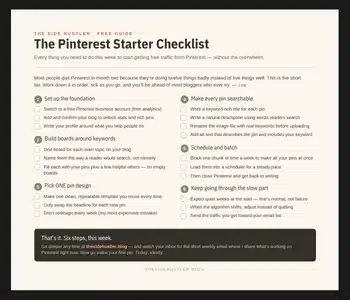
Download Your Free Pinterest Starter Checklist
Grab the free one-page checklist that shows you exactly what to do first, next, and after that.
Recommended Reading
- Pinterest for Bloggers
- MailerLite Review 2026
- How to Write a Welcome Email Sequence
- 15 Freebie Ideas to Grow Your Email List
