
Table of Contents
This post contains affiliate links. If you click through and buy something, I may earn a small commission — at no extra cost to you. I only recommend tools I’ve actually used or thoroughly researched.
Most Pinterest beginners spend a lot of time on their pin images and almost no time on their Pinterest pin titles and descriptions. That’s a mistake.
Your pin image gets the scroll to stop. Your title and description are what convince someone to click, and they’re doing a second job at the same time, telling Pinterest’s algorithm exactly what your content is about so it can show it to the right people.
Get both right and you’ve got a pin that gets found and gets clicked. Get one wrong and you’re leaving traffic on the table.
This guide covers exactly how to write Pinterest pin titles and descriptions that do both jobs well. Along the way you’ll pick up practical pinterest pin title tips you can apply to your very next pin.
Recommended reading: Pinterest Keyword Research
Why Pinterest Pin Titles and Descriptions Matter So Much
When someone searches on Pinterest, the algorithm scans the text associated with every pin, the title, the description, the board it’s saved to, and the profile it came from, to decide which pins are most relevant to that search.
Your pin title and description are two of the most heavily weighted signals in that process. If they don’t contain the keywords your audience is searching for, your pin won’t appear in those searches, no matter how good the image is.
But there’s a second layer to this. Once your pin does appear in search results, your title and description need to convince a real human to click. That means they have to be readable, specific, and truly useful, not just keyword-stuffed text that satisfies an algorithm.
Both things have to be true at the same time. That’s the skill.
According to Pinterest’s creative best practices, pins with clear, descriptive titles consistently outperform those without, both in search visibility and click-through rates. The title isn’t optional. It’s doing real work.
Free Pinterest Training Workshop
Content ideas are only useful if your Pinterest strategy is solid enough to make them work. Meagan Williamson’s free workshop — The Discovery Loop — covers the full system so your content gets found.
How to Write Pinterest Pin Titles That Get Found and Get Clicked
Your pin title is the first line of text that appears below your pin image in search results. It’s what Pinterest reads first to assess relevance, and it’s what the reader reads first to decide if your content is worth their time.
Start With Your Keyword
Before you write your title, do a quick search on Pinterest for your topic. Look at the autocomplete suggestions, those are your keywords. Choose the most relevant one and make sure it appears naturally in your title.
Don’t force it. If the keyword doesn’t fit naturally in a sentence that makes sense to a human reader, rewrite the title until it does.
Be Specific About What the Reader Gets
Vague titles don’t convert. “Pinterest Tips” tells the reader almost nothing. “5 Pinterest Pin Design Mistakes That Are Killing Your Click-Through Rate” tells them exactly what they’re getting and creates enough curiosity to click.
Ask yourself: if someone read only the title, would they know exactly what they’d find if they clicked through? If the answer is no, the title needs work.
Use Numbers Where They Fit
Numbered titles consistently outperform non-numbered ones on Pinterest, “7 Ways to…” or “5 Steps to…” They set clear expectations and feel more concrete than vague promises.
Don’t force numbers into every title. But when a numbered format fits naturally, use it.
Keep It Under 100 Characters
Pinterest displays a limited number of characters in the title before cutting off. Aim to get your most important information, including your keyword, into the first 40–60 characters so nothing critical gets cut.
Good Pinterest Title Examples
- “How to Start a Pinterest Business Account in 2026 (Step by Step)”
- “10 Side Hustle Ideas for Beginners That Actually Pay”
- “Pinterest Keyword Research: How to Find the Right Words Fast”
- “Easy Meal Prep for Beginners: Save Time and Money Every Week”
Notice what these have in common: a clear keyword, a specific benefit or promise, and enough detail to set expectations without being overwhelming.
How to Write Pinterest Pin Descriptions That Convert
Your pin description appears when someone clicks on a pin to expand it. It gives Pinterest more context about your content and gives the reader more reason to click through to your blog. A strong pinterest description for bloggers does double duty: it earns the click and it teaches the algorithm what your content is really about.
A good pin description does three things: uses keywords naturally, expands on the promise made in the title, and ends with a clear call to action.
Length
Aim for 100–150 words. Long enough to include your keywords and give context, short enough that a reader on their phone will actually read it.
Pinterest allows up to 500 characters in pin descriptions. Don’t feel obligated to fill all of it. Clear and concise beats long and padded every time.
Structure That Works
Here’s a simple formula that works for almost any niche:
Sentence 1: State what the pin is about, including your primary keyword naturally. Sentences 2–4: Expand on what the reader will find, specific benefits, what they’ll learn, or what problem it solves. Work in related keywords where they fit naturally. Final sentence: Clear call to action.
Example Pin Description
Here’s what this looks like in practice for a post about Pinterest keyword research:
“Pinterest keyword research is one of the most important things you can do to get your pins found in search. In this guide, you’ll learn how to use the Pinterest search bar to find the exact keywords your audience is searching for, where to use them across your profile, boards, and pins, and how to build a keyword strategy that drives consistent traffic to your blog. Save this pin and click through for the full step-by-step guide.”
That description includes the primary keyword in the first sentence, expands on the value naturally, uses related keywords without stuffing, and ends with a call to action. It’s written for a human reader first and an algorithm second.
Use Related Keywords Naturally
Your description is a good place to work in secondary keywords, variations and related phrases that support your primary keyword. Don’t list them. Weave them into sentences that make sense.
If your primary keyword is “pinterest pin design,” your description might naturally include phrases like “create pinterest pins,” “pin templates,” “canva for pinterest,” and “click-worthy pins,” all related terms that strengthen your SEO without making the description feel unnatural.
Always End With a Call to Action
Tell the reader what to do next. “Click through for the full guide,” “Save this for later,” “Read the step-by-step on the blog,” it doesn’t need to be elaborate. A clear CTA at the end of your description consistently improves click-through rates.
Free Pinterest Training Workshop
Content ideas are only useful if your Pinterest strategy is solid enough to make them work. Meagan Williamson’s free workshop — The Discovery Loop — covers the full system so your content gets found.
The Difference Between Your Pin Title and Your Blog Post Title
This trips up a lot of beginners. Your pin title doesn’t have to be the same as your blog post title, and often it shouldn’t be.
Your blog post title is built for Google search. Your pin title is built for Pinterest search. The keywords and phrasing that work on one platform don’t always translate directly to the other.
For example, a blog post titled “How to Do Pinterest Keyword Research for Your Blog in 2026” might become several different pin titles:
- “Pinterest Keyword Research for Beginners: Find the Right Words Fast”
- “How to Find Pinterest Keywords (Without Any Paid Tools)”
- “The Simple Way to Do Pinterest Keyword Research in 2026”
Each targets a slightly different search angle. Each links to the same blog post. This is one of the reasons you create multiple pin designs per post, different titles target different searches and appeal to different readers.
Creating Titles and Descriptions at Scale
If you’re creating multiple pins per blog post and doing it consistently, you need a workflow that makes writing pinterest pins that convert fast without them becoming generic.
Here’s what works:
Step 1: Keyword research first. Before you write anything, spend three minutes on Pinterest searching your topic. Note the top autocomplete suggestions. These are your title options.
Step 2: Write your titles before you open Canva. Having your titles written first means your pin image can be designed to support the headline rather than the other way around.
Step 3: Write one strong description per blog post, then vary it slightly across pin versions. You don’t need a completely unique description for every pin linking to the same post, just vary the opening sentence and the keywords you emphasize to keep it feeling fresh.
Step 4: Save your best descriptions. Keep a simple doc with your best-performing pin descriptions. When you’re creating new pins for similar topics, these become templates you can adapt rather than starting from scratch.
If you want a structured approach to all of this, keyword research, titles, descriptions, and pin strategy together, Meagan Williamson’s Pinterest course covers it as a complete system. It’s the course I took, and her approach is practical, not theoretical.
Common Mistakes to Avoid
Keyword stuffing. Repeating your keyword five times in a 100-word description doesn’t help, it actively hurts your distribution. Pinterest’s algorithm detects it. Write naturally.
Generic titles. “Pinterest Tips 2026” is not a title. It’s a label. Give the reader a reason to click.
No call to action. Leaving your description without a CTA is leaving clicks on the table. Always tell the reader what to do next.
Copying your blog post intro as the description. Your blog post intro is written for someone who’s already on your site. Your pin description is written for someone who’s still deciding whether to visit. They need different things.
Using the same title and description on every pin for the same post. Pinterest can flag this as spam. Vary your titles and descriptions across pin versions, even if they all link to the same URL.
Final Thoughts
Pinterest pin titles and descriptions are doing two jobs simultaneously, convincing an algorithm to show your content to the right people, and convincing a real human to click through to your blog.
Neither job is hard once you understand what’s needed. Start with your keyword, write a specific and benefit-driven title, expand on the value in your description, and end with a clear call to action.
Do that consistently across every pin you create and your click-through rates will improve. It’s not complicated, it just needs to be done every time.
Next step: Pinterest Visual SEO Guide
Questions about writing Pinterest pin titles and descriptions? Leave them in the comments.
Recommended Reading
- Pinterest for Bloggers: How to Get Free Traffic in 2026
- Pinterest Pin Design
- Pinterest Keyword Research
- Pinterest SEO for Beginners
- How to Use Canva for Pinterest
- How to Schedule Pinterest Pins in 2026
Good titles and descriptions only pay off when the rest of your Pinterest setup is solid underneath them. The free Pinterest Starter Checklist below covers those fundamentals on one page. Grab it and build from there.
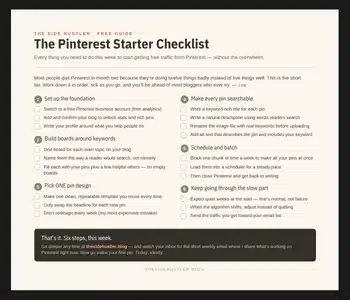
Download Your Free Pinterest Starter Checklist
Grab the free one-page checklist that shows you exactly what to do first, next, and after that.
