
Table of Contents
This post contains affiliate links. If you click through and buy something, I may earn a small commission — at no extra cost to you. I only recommend tools I’ve actually used or thoroughly researched.
Most people skip Pinterest keyword research completely. They make a nice-looking pin, type whatever sounds good in the description, and then wonder why nobody sees it. This is the simple, free way to find the exact words your readers are typing, and it covers how to do keyword research on Pinterest with no paid tools, about five minutes per topic.
I’ll be honest about my own setup near the end. But you don’t need anything fancy to start, the free method below is what I’d point any beginner to, and it’s most of what you’ll ever need.
Why Pinterest Keyword Research Matters for Getting Found
Pinterest is a search engine. People type words into the search bar, and Pinterest shows them pins that match those words, the same way Google works. So if your pin’s title and description don’t use the words people actually search, you stay invisible. It doesn’t matter how good the design is.
Here’s the honest truth after doing this for a while: the biggest mistake I see beginners make isn’t picking slightly wrong keywords. It’s doing no keyword research at all, pinning on vibes and hoping. Five minutes of what’s below fixes that, and it’s the highest-value five minutes you’ll spend on Pinterest all week.
If you want the bigger picture of how Pinterest traffic works, start with my Pinterest for bloggers guide. This post is the keyword piece in detail, and it’s really the heart of pinterest seo keywords done right: the rest of your strategy is built on top of this step.
The Free 5-Minute Pinterest Autocomplete Method
Start typing a topic into the Pinterest search bar and watch the suggestions drop down. That’s it. Those suggestions are real searches, roughly ordered by how often people use them.
Say you type “budgeting”. You’ll see things like:
- budgeting for beginners
- budgeting tips
- budgeting binder
- budgeting worksheets
- budgeting monthly
Every one of those is a keyword, and usually a pin and a blog post waiting to be made. Do this for each main topic you write about, and write the suggestions down as you go. That list is your keyword research, done in minutes, for free.
The trick most people miss: pay attention to the order. The suggestions near the top are searched more often. So you’re not just getting keywords, you’re getting them ranked by demand, straight from Pinterest.
Use Guided Search Tiles to Find Long-Tail Keywords on Pinterest
Once you hit enter on a search, you’ll see a row of colored tiles appear under the search bar. Those are related keywords, and they’re how you find the easier, more specific searches.
Take your “budgeting” search and tap the “for beginners” tile, now you’re looking at “budgeting for beginners,” a more specific search with less competition. Stack another tile on top and you get something like “budgeting for beginners monthly,” which is even easier to show up for when your account is new.
These longer, more specific phrases are called long-tail keywords, and they’re where new accounts actually win. You’re not going to outrank everyone for “budgeting” in week one. You can absolutely get found for “budgeting binder printable for beginners.”
How to Read Top Pinterest Pins Like a Cheat Sheet
Look at the pins already ranking for your keyword. The words that keep showing up in their titles and descriptions are the words Pinterest connects to that search. Borrow the pattern, not the pins themselves.
Once you’ve got a little traffic of your own, your Pinterest analytics become the best keyword tool you have. They show you which search terms are already bringing people to your pins, so you can make more of what’s clearly working instead of guessing. Pinterest also has a free tool, Pinterest Trends, that shows which searches are rising and which months they spike, handy for planning seasonal content a month or two ahead.
One More Free Trick to Get Real Pinterest Keyword Data
The methods so far tell you what people search. If you also want to know how much, actual search volumes, there’s a free way to get them, though it’s a little more fiddly.
Inside your Pinterest business account, start creating an ad campaign (you never have to publish it) and go to the keyword targeting step. Type a keyword in and Pinterest shows you a list of related terms with their monthly search ranges. Search “budgeting” and you’ll see the broad terms pulling huge numbers, plus a stack of smaller, specific phrases you can actually win. You’re not running an ad, you’re just borrowing Pinterest’s own data. Close the campaign when you’re done.
This is overkill on day one. But once you’re choosing between a few keywords and want to back the busiest one, it’s the closest thing to hard numbers Pinterest gives you for free.
How to Turn Keywords into a Pinterest Content Plan
This is the part most people skip, and it’s where keyword research pays off. One search can become a week of content.
Type “things to make and sell” and the suggestions hand you:
- things to make and sell at home
- things to make and sell for beginners
- things to make and sell with Cricut
- things to make and sell without inventory
That’s four blog post ideas and a dozen pins from a single search. Keep a running doc, one column for the keyword, one for the pin title you’ll write, one for the post it points to. Now you’re never staring at a blank screen wondering what to pin.
Pinterest Keyword Placement: Where to Use Them for Growth
A keyword does nothing sitting in a doc. Once you’ve found it, put it to work. This is the practical side of finding keywords on Pinterest, actually placing them where Pinterest reads them:
- The pin title
- The pin description, in a real sentence, not a comma-stuffed pile of keywords (that trips Pinterest’s spam filter)
- The text on the pin image itself
- The board name you pin it to
- The image filename, before you upload
- Your blog post’s title and headers
- And your Pinterest profile name and bio, so your whole account signals what you’re about
I break down exactly how to write each of those in the Pinterest for bloggers guide, so I won’t repeat it all here, just know that the keyword has to travel from your research doc onto the actual pin and post, or it was a wasted five minutes.
My Honest Setup (And Why You Don’t Need It)
I’ll be straight with you, because I said I would. After about 18 months of tweaking, I now run my own custom AI setup that speeds all of this up. It saves me real time.
But I wouldn’t tell a beginner to chase that. You don’t need it to start, and I wouldn’t spend a penny trying to shortcut keyword research on day one. The free autocomplete method above is exactly how I got going, and it’s still what I recommend to anyone new. If you’re curious how I lean on AI across my whole Pinterest workflow once you’re further along, I wrote about it in my AI-powered Pinterest workflow.
The thing that actually pulled my whole Pinterest approach together, keyword research included, was Meagan Williamson’s Pinterest course. It showed me what I’d been quietly getting wrong. It’s a paid course, so it’s a “when you’re ready to take this seriously” step rather than a day-one buy, and if you want to see how she teaches first, her free Pinterest class costs nothing and is a fair place to start.
Free Pinterest Training Workshop
Content ideas are only useful if your Pinterest strategy is solid enough to make them work. Meagan Williamson’s free workshop — The Discovery Loop — covers the full system so your content gets found.
The One Mistake That Costs You The Most
It’s not picking an imperfect keyword. It’s doing none of this and pinning on hope. A plain pin with the right keywords will beat a beautiful pin with none, every single time. So before you design anything, spend the five minutes.
Your Next Step
Pick your single biggest topic, open Pinterest, and run the autocomplete trick right now. Write down ten keywords before you close the tab. That’s your next week of pins sorted.
Want the full process in one place? Grab the free Pinterest Starter Checklist below, then go find those ten keywords. It really does take five minutes.
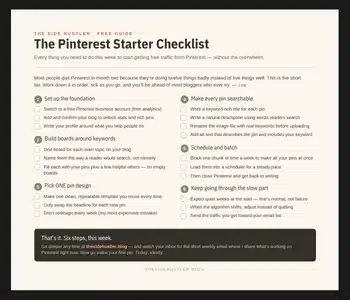
Download Your Free Pinterest Starter Checklist
Grab the free one-page checklist that shows you exactly what to do first, next, and after that.
