
Table of Contents
This post contains affiliate links. If you click through and buy something, I may earn a small commission — at no extra cost to you. I only recommend tools I’ve actually used or thoroughly researched.
Pinterest SEO for beginners sounds technical. It isn’t. At its core, it’s about one thing, making it easy for Pinterest to understand what your content is about so it can show it to the right people.
You don’t need to understand algorithms or dig into technical audits. You just need to know where keywords go, how Pinterest reads your content, and what signals it uses to decide who sees your pins.
This guide covers all of that in plain language, exactly how to do Pinterest SEO from your profile down to your image file names. By the end you’ll know exactly what to do, and more importantly, why it works.
Recommended reading: Pinterest Keyword Research
Free Pinterest Training Workshop
Content ideas are only useful if your Pinterest strategy is solid enough to make them work. Meagan Williamson’s free workshop — The Discovery Loop — covers the full system so your content gets found.
What Pinterest SEO Actually Is
SEO stands for search engine optimization. On Google, it means making your website content rank higher in search results. On Pinterest, it means the same thing, but the search engine is Pinterest itself.
When someone types “side hustle ideas for beginners” into Pinterest, the platform scans millions of pins and decides which ones to show first. It’s making that decision based on relevance, quality, and engagement signals.
Pinterest SEO for beginners is about understanding what those signals are and making sure your content sends the right ones.
The good news is that Pinterest SEO is much more accessible than Google SEO. You don’t need backlinks, domain authority, or years of content history. A brand new account with well-made, keyword-rich pins can start appearing in search results within weeks.
Pinterest is enormous. By Pinterest’s own numbers, users save well over a billion pins every single week, that’s the scale of content your pins are up against. Getting your SEO right is what separates the pins that get found from the ones that don’t.
How Pinterest Decides What to Show in Search Results
Pinterest uses several factors to rank content in search results. Understanding these helps you make better decisions about how to set up your pins and profile.
Keyword relevance. Does your content match what the person searched for? Pinterest looks at the keywords across your pin title, description, board name, board description, and profile bio to determine this.
Pin quality. Pinterest assesses the quality of a pin based on engagement signals, saves, clicks, and close-ups. A pin that gets saved and clicked tells Pinterest it’s resonating with searchers. One that gets scrolled past tells Pinterest the opposite.
Domain quality. Pinterest tracks how well content from your website performs over time. If your pins consistently drive clicks and engagement, Pinterest rewards your domain with better distribution. This is one reason why consistency matters so much in the early stages.
Freshness. Pinterest favors fresh content, new pins with new images and new descriptions. This doesn’t mean your old content is worthless, but it does mean you should keep creating new pins for your best posts rather than just relying on ones you made months ago.
Account activity. An active account that pins regularly signals to Pinterest that you’re a reliable content source. Sporadic activity gets less distribution than consistent daily pinning.
Pinterest SEO for Beginners: The Full Checklist
Here’s every place you need to get right, and what to do in each one.

1. Your Pinterest Profile
Your profile is the first thing Pinterest reads to understand what your account is about. Two things matter here.
Your display name. You can add a keyword or two after your name, something like “Lee | Blogging & Pinterest Tips.” Keep it natural. Pinterest has cracked down on keyword-stuffed names, and it looks unprofessional anyway.
Your bio. This is prime SEO real estate. Write 2–3 sentences that describe what you do and who you help, using the keywords your audience would search for. Be specific. “Helping beginner bloggers build traffic through Pinterest and email marketing” is better than “I love blogging and sharing tips.”
2. Your Boards
Boards are the second most important SEO element on your Pinterest account. Every board needs two things done right.
Board title. Use a keyword-rich title that describes exactly what the board covers. Think about how your reader would search for this topic. “Easy Dinner Recipes for Beginners” beats “Yummy Food Ideas” every time.
Board description. Write 2–3 sentences using natural language and relevant keywords. Don’t just list keywords, write it like you’re explaining the board to someone who’s never seen it. Pinterest reads this to understand the board’s topic and who to show it to.
One thing most beginners miss: your board descriptions are doing a lot of SEO work quietly in the background. Don’t leave them blank.
3. Your Pin Titles
Pin titles are one of the highest-impact places for Pinterest SEO. They appear prominently in search results and are one of the first things Pinterest reads to assess relevance.
A good pin title:
- Includes your primary keyword for that pin
- Clearly communicates what the reader will get
- Is written for humans, not just algorithms
- Is specific rather than vague
“How to Start a Blog in 2026 (Step by Step for Beginners)” will outperform “Blogging Tips,” both in search rankings and click-through rates.
4. Your Pin Descriptions
Pin descriptions give you space to use keywords naturally and give the reader more context before they click.
Aim for 100–150 words. Here’s a simple structure that works:
- First sentence: Include your primary keyword naturally
- Middle: Expand on what the reader will find, using related keywords where they fit
- End: Clear call to action, “Read the full guide,” “Save this for later,” “Click through for the step-by-step”
Don’t keyword stuff. Pinterest’s algorithm is good at detecting unnatural keyword density, and it hurts your distribution rather than helping it.
5. Your Image File Names
Before uploading any pin image, rename the file using your keywords. “pinterest-seo-for-beginners-tips.jpg” sends a signal to Pinterest about what the image is about. “IMG_4782.jpg” sends nothing.
It takes five seconds and it’s worth doing consistently.
6. Alt Text on Your Blog Images
When you add an image to a blog post, give it descriptive alt text that works your keyword in naturally. Alt text quietly does two jobs at once, and both matter here.
First, it’s for accessibility and for Google, it describes the image for anyone using a screen reader, and it helps your image show up in Google image search.
Second, and this is the Pinterest part: when someone saves one of your images from your site, your alt text is what Pinterest drops in as the starting pin description. So good alt text gives every saved pin a head start, it lands on Pinterest already describing itself, instead of blank.
The trick is to write it naturally. Describe what’s actually in the image, the way you would to someone who can’t see it, and let your keyword sit where it fits. Don’t stuff it, a screen reader reads this out loud, and Pinterest favors natural language anyway.
In WordPress, you add alt text right in the image block, in the settings panel on the right.
7. Rich Pins
Rich pins pull information straight from your website, your post title, description, and author, and show it right on the pin. They look more complete than a plain pin, and they tend to get more engagement because the reader gets more context before they click.
Here’s the good news: setting them up is far easier than it used to be. You used to have to validate and apply through a Pinterest tool. That step is gone, Pinterest now reads your site automatically. There’s nothing to submit and nothing to wait for approval on.
All you need to do is three things:
- Turn on Open Graph metadata. If you’re using Rank Math or Yoast SEO, this is already on by default, your posts are sending Pinterest everything it needs. Nothing to code.
- Claim your website on Pinterest. In your Pinterest settings, go to Claimed accounts, add your site, and verify it. This connects your site to your account and puts your profile next to your pins.
- Clear your cache. If you run a caching plugin or a CDN, purge it. This is the step most people skip, and it’s the usual reason rich pins don’t show up. Pinterest needs to read a fresh version of your page, not a cached one.
Give it up to 24 hours and your pins start showing the richer layout, both new pins and older ones that link back to your posts. To check it worked, click into one of your pins. If you see your post title and site name pulled in above the image, you’re done.
Full setup guide: How to Set Up a Pinterest Business Account
The Difference Between Pinterest SEO and Google SEO
If you’ve done any work on Google SEO for your blog, some of this will feel familiar. But there are important differences worth understanding.
No backlinks. Google weighs backlinks heavily, links from other websites pointing to yours. Pinterest doesn’t work this way. Your SEO on Pinterest is entirely within Pinterest itself. No off-platform authority building required.
Engagement signals matter more. On Pinterest, saves and clicks directly influence how widely your content gets distributed. A pin that gets saved repeatedly tells Pinterest it’s high quality. On Google, engagement metrics are more indirect.
Faster results. A new Pinterest account with good SEO can start appearing in search results within weeks. Getting a new website to rank on Google for competitive keywords takes months or years.
Shorter keyword phrases. Pinterest users tend to search with shorter, more conversational phrases than Google users. “Easy budget meals” rather than “how to cook budget meals for a family of four.” Keep your keywords relatively concise.
Visual relevance. Pinterest also assesses the visual quality and relevance of your image. A clear, well-designed pin that visually matches the search intent performs better than one that looks unrelated to the keyword.
How Long Does Pinterest SEO Take to Work?
This is the question everyone asks, and the honest answer is: longer than you want, but faster than Google.
Most bloggers start seeing meaningful traffic from Pinterest within 60–90 days of consistent, well-targeted pinning. The first month is slow, Pinterest is building up a picture of your account, your audience, and how people respond to your content.
After that, things start to compound. Pins you created in month one start getting found by new searchers. New pins build on the authority your account has been accumulating. The floor gets higher month by month.
That tracks with my own experience on this blog, a trickle of traffic early on, then real momentum from around the second and third month, once Pinterest had a feel for my account.
The key is consistency. Sporadic bursts of pinning followed by weeks of silence reset the momentum. Show up every day, even if it’s just a handful of pins, and let the SEO work build over time.
Common Pinterest SEO Mistakes Beginners Make
Ignoring board descriptions. Most beginners write their pin titles and descriptions but leave board descriptions blank. Pinterest reads all of it. Fill them in.
Using the same keyword phrase everywhere. Repeating the exact same keyword across every pin and board looks spammy. Use variations and related terms to show Pinterest the full picture of your niche.
Creating pins without keyword research. Designing a pin and then adding a title is backwards. Start with keyword research, then create a pin around the keyword you’ve identified. The keyword should drive the content, not the other way around.
Giving up too early. Pinterest SEO takes time. The biggest mistake beginners make is pinning consistently for three or four weeks, seeing limited results, and concluding that Pinterest doesn’t work. It works, it just takes longer than three weeks.
Pinning inconsistently. Pinning 40 times in one day and then disappearing for two weeks doesn’t work. Pinterest rewards consistent daily activity. Small and steady beats big and sporadic.
Tools That Help With Pinterest SEO
You don’t need any paid tools to do Pinterest SEO well. The search bar is free and it’s the best keyword research tool available for Pinterest.
That said, a few things make the process easier. Together they cover most of the pinterest seo tips 2026 has to offer, without needing a paid subscription to any of them:
Pinterest Trends (free): shows you what’s trending on the platform so you can plan content around rising search interest before it peaks.
Canva (free version is fine): for creating well-designed pins that perform well visually. A pin that looks good gets more saves, which improves its SEO.
Tailwind: for scheduling pins consistently without having to be on Pinterest every day. Consistency is an SEO signal, and scheduling tools make consistency easier to maintain.
If you want a structured approach to Pinterest SEO rather than figuring it out piece by piece, Meagan Williamson’s Pinterest course covers keyword research, profile setup, and pin strategy in a way that makes the whole system click. It’s the course I took when I was getting started, and it filled in a lot of gaps.
Free Pinterest Training Workshop
Content ideas are only useful if your Pinterest strategy is solid enough to make them work. Meagan Williamson’s free workshop — The Discovery Loop — covers the full system so your content gets found.
Putting It All Together
Pinterest SEO for beginners comes down to this: be clear and consistent about your topic everywhere on your account, create well-designed pins with strong titles and descriptions, and show up regularly enough for Pinterest to build a picture of who your audience is. In short, pinterest search optimization is a habit, not a one-time setup task.
None of it is complicated. All of it takes time.
The bloggers who get consistent Pinterest traffic aren’t doing anything clever. They’re just doing the basics properly, every day, for long enough that the results have time to show up.
Next step: Pinterest Pin Design
Questions about Pinterest SEO? Drop them in the comments, I read every one.
Recommended Reading
- Pinterest for Bloggers: How to Get Free Traffic in 2026
- Pinterest Keyword Research
- Pinterest Strategy for Beginners
- Pinterest Pin Design
- Pinterest Analytics Guide
- How to Set Up a Pinterest Business Account
Pinterest SEO works best once the basics underneath it are solid. The free Pinterest Starter Checklist below walks you through those first steps on one page. Grab it and get going.
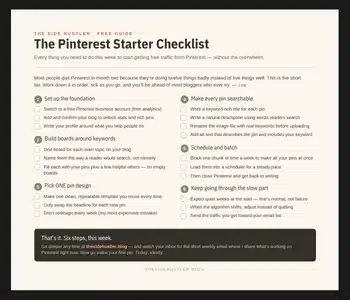
Download Your Free Pinterest Starter Checklist
Grab the free one-page checklist that shows you exactly what to do first, next, and after that.
