
Table of Contents

This post contains affiliate links. If you click through and buy something, I may earn a small commission — at no extra cost to you. I only recommend tools I’ve actually used or thoroughly researched.
When you first look at Pinterest as a blogger, it’s easy to think there’s some complicated system behind it that you’re missing. There isn’t.
What there is, is a simple repeatable process, and a lot of patience. When I started, I had a bit of traffic coming in during month one. Not much, but it was there, and it built as the month went on and kept climbing into month two. It came with spikes and dips that felt random at the time but are completely normal. Pinterest takes time to work out who your audience is, and until it does, results are hit and miss.
That’s not a reason to avoid it. It’s just what you need to know going in.
This post lays out a straightforward Pinterest strategy for beginners, the kind that builds traffic over time, without making you feel like you need a marketing degree to follow it. There’s a free one-page checklist at the bottom too, so you don’t have to hold all eight steps in your head as you read.
Recommended reading: Pinterest for Bloggers: How to Get Free Traffic in 2026
Free Pinterest Training Workshop
Content ideas are only useful if your Pinterest strategy is solid enough to make them work. Meagan Williamson’s free workshop — The Discovery Loop — covers the full system so your content gets found.
What a Pinterest Strategy for Beginners Actually Needs to Do
Before we get into the steps, it’s worth being clear on what we’re trying to achieve.
A Pinterest strategy for beginners needs to do three things:
- Get your content in front of people who are searching for it
- Give Pinterest enough signals to understand who your audience is
- Be consistent enough to sustain itself without burning you out
That’s it. You don’t need to be pinning 30 times a day or obsessing over every metric. You need a simple system you can stick to.
The bloggers who get the best results from Pinterest aren’t necessarily the ones doing the most, they’re the ones who show up consistently over months, not just weeks.
Step 1: Get Clear on Your Niche Before You Pin Anything

Pinterest works by matching content to searchers. The more clearly your account signals what it’s about, the better Pinterest gets at showing your pins to the right people.
That’s why a scattered account, pinning recipes one day, home decor the next, then business tips, confuses the algorithm and slows your growth. Pinterest doesn’t know who to show your content to, so it hedges its bets and shows it to fewer people.
Before you start pinning, get clear on:
- What your blog is about: be specific, not broad
- Who your reader is: what are they searching for?
- What problems your content solves: this is what your pins need to communicate
Once you’re clear on this, everything else follows. Your boards, your pins, your descriptions, they all reinforce the same message about who you are and who you help.
Recommended reading: Best Pinterest Niches in 2026
Step 2: Set Up Your Account Properly, Once
This is a one-time job, but it matters. A poorly set up Pinterest business account is like opening a shop with no sign on the door.
The key things to get right:
- Switch to a business account: free, and unlocks analytics
- Claim your website: Pinterest prioritizes content from verified domains
- Write a keyword-rich profile bio: describe what you do in plain language using the words your readers search for
- Use a clear profile photo: your face or your logo, whichever fits your brand
Your profile bio isn’t the place to be creative. “I help new bloggers build traffic and income using Pinterest and email marketing” does more work than anything vague or clever.
Full walkthrough: How to Set Up a Pinterest Business Account
Step 3: Build Your Boards Around Keywords
Your boards are the foundation of your Pinterest strategy. Each board should cover one specific topic, and that topic should be something your target reader is actively searching for.
Name your boards the way your readers search, not the way you think about your content. “Side Hustle Ideas for Beginners” works better than “My Favorite Hustles.” “Easy Meal Prep for Busy Moms” works better than “Food I Love.”
For each board:
- Write a proper description using natural language and relevant keywords
- Start with 10–20 pins before you start actively promoting the board
- Keep it focused: one topic per board, no exceptions
Aim for 10–15 boards when you’re starting out. You can always add more later. Better to have 10 well-kept boards than 30 half-empty ones.
Recommended reading: Pinterest Board Strategy
Step 4: Do Your Keyword Research First

Pinterest keyword research sounds more complicated than it is. The simplest method costs nothing and takes five minutes.
Go to Pinterest. Start typing your topic into the search bar. Watch the autocomplete suggestions. Those are real searches from real people, telling you exactly how your audience is looking for content like yours.
Hit search and look at the colored topic bubbles that appear, these are related searches, and they’re gold for finding variations and long-tail keywords you might not have thought of.
Write down the keywords relevant to your content. Then use them, in your board titles, board descriptions, pin titles, pin descriptions, and even the file names of the images you upload.
The goal is consistency. The more clearly and consistently you signal your topic across your whole account, the faster Pinterest works out who to show your content to.
Go deeper: Pinterest Keyword Research and Pinterest SEO for Beginners
Step 5: Create Pins That Are Worth Clicking
A good Pinterest strategy for beginners lives or dies on pin quality. You can have perfect keywords and a well-structured account, but if your pins don’t make people want to click, none of it matters.
The standard pin size is 1000 x 1500 pixels, vertical format. Stick to it.
What makes a pin worth clicking:
- A clear headline: that tells the reader exactly what they’ll get
- Readable text: high contrast, large enough to read on a phone screen
- A clean design: not cluttered, not too busy
- Consistent branding: same fonts and colors across all your pins so people start to recognize your content
Canva is the tool most bloggers use for this, and for good reason. The free version has Pinterest pin templates built in, you don’t need to design from scratch. If you want to go deeper on pin design, Meagan Williamson’s Pinterest Beginners Course covers pin creation as part of a full beginner strategy, it’s the course I took when I was starting out, and it earns the recommendation.
Create 3–5 different pin designs per blog post. Vary the headline and image, keep the same destination URL. That gives you more chances to get traction and helps you learn which style your audience responds to.
One thing I’d save you from: when I started, I burned a big chunk of my first month making version after version of the same pin, tweaking colors, swapping fonts, second-guessing every layout. It felt productive. It wasn’t. You’re far better off getting a few solid designs out, seeing what Pinterest responds to, and then improving the ones that earn it. Polish is a month-three problem, not a month-one one.
Full guide: Pinterest Pin Design
Step 6: Pin Consistently, This Is the Part Most Beginners Skip
Here’s the honest truth about Pinterest strategy: the biggest mistake beginners make isn’t getting their keywords wrong or using the wrong pin size. It’s inconsistency.
Pinterest rewards accounts that show up regularly. Pinning 50 times on a Saturday and then disappearing for two weeks doesn’t work. Pinning 3–5 times a day, every day, does.
I know that sounds like a lot. But you’re not creating 5 new blog posts a day, you’re creating multiple pin designs for each post and spreading them out. One blog post can give you a week’s worth of pins if you make a few different designs.
To keep this manageable, use a scheduler. Pinterest has a built-in one that’s free and works well once you know what you’re doing. If you’re just starting out and want something that makes it easier, Tailwind is worth a look, the queue system and posting-time suggestions take the guesswork out of it, and the Communities feature can get your pins extra exposure in your niche.
For what it’s worth, I started with Tailwind myself and still dip into it now and then. I’ve also leaned on Buffer a lot since, mainly because it handles my other social platforms in one place. Pinterest’s own scheduler works fine too. It really comes down to what fits your workflow. If you want the full breakdown before deciding, my Tailwind Social Media Scheduler page covers what it does and who it’s worth it for.
Full guide: How to Schedule Pinterest Pins in 2026
Step 7: Be Patient While Pinterest Figures Out Your Audience
This is the part of the strategy nobody wants to hear, but it’s the most important.
Pinterest takes time to understand who your audience is. In the early months, you’ll see spikes and dips in your analytics that feel random. A pin will suddenly take off, then go quiet. Another will sit dormant for weeks and then start getting clicks out of nowhere.
This is normal. It’s Pinterest testing your content against different audiences to work out who engages with it.
Like I said up top, I had some traffic in month one, but it was slow, and it stayed slow for a while before it built. The growth that matters on Pinterest happens between months two and six, not in the first few weeks.
Don’t judge Pinterest by what happens in your first month. Give it three months of consistent effort before drawing any conclusions. Most people quit before they get to the good part.
According to Pinterest’s business resources, content on Pinterest has a much longer lifespan than on other platforms, which means the pins you create today can keep driving traffic long after you’ve moved on to writing new content.
Step 8: Check What’s Working and Do More of It
Once you’ve been pinning consistently for a few weeks, your Pinterest Analytics will start giving you useful information.
The main things to look at:
- Which pins are getting the most clicks: saves are nice, but clicks send people to your blog
- Which boards are driving engagement: tells you which topics are resonating
- Referral traffic in Google Analytics: cross-check what Pinterest says with what your blog analytics show
When something is working, make more content like it. When something consistently underperforms, adjust the design or description and try again.
You’re not looking for perfection here. You’re looking for patterns.
Full guide: Pinterest Analytics Guide
How Long Does a Pinterest Strategy Take to Work?
Truthfully? Longer than most people expect.
The first month is slow. You’re building your account, setting up your boards, creating pins, and waiting for Pinterest to figure out your audience. Traffic trickles in.
Months two and three are where things start to pick up, if you’ve been consistent. You’ll notice certain pins getting more traction. Your referral traffic from Pinterest will start showing up more regularly in your analytics.
By month four to six, if you’ve stuck with it, Pinterest traffic starts to feel reliable rather than random.
The spikes and dips never fully go away, that’s just how the platform works. But over time, the floor gets higher. Your worst weeks in month six are better than your best weeks in month one.
A Simple Weekly Pinterest Routine
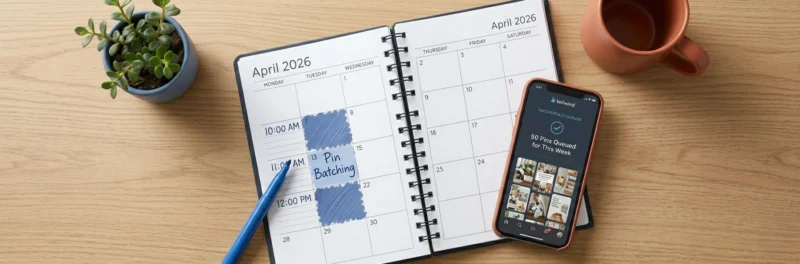
You don’t need to spend hours on Pinterest every day. Here’s a routine that works without taking over your week. These pinterest tips for beginners are the whole system, not a starting point for something more complicated:
Daily (10–15 minutes):
- Check your scheduler is queued up with pins for the day
- Glance at any notifications
Weekly (1–2 hours, one sitting):
- Create 5–10 new pin designs for recent or evergreen posts
- Schedule them out across the coming week
- Check analytics briefly, anything performing unusually well or badly?
Monthly (30 minutes):
- Deeper analytics review
- Update any board descriptions that could be stronger
- Check if any older pins need a fresh design to give them new life
That’s it. Pinterest doesn’t have to eat your week, it just has to be consistent.
Want to Shortcut the Learning Curve?
I figured a lot of this out through trial and error over my first few months. If you’d rather not do it the hard way, the course that helped me most when I was starting out was Meagan Williamson’s Pinterest Beginners Course.
Meagan has been on Pinterest since its early days and has helped thousands of bloggers and business owners build real Pinterest traffic. Her beginner course covers setup, keywords, pin creation, and strategy in a way that makes sense, no fluff, no hype.
It’s the course I wish I’d found on day one.
Free Pinterest Training Workshop
Content ideas are only useful if your Pinterest strategy is solid enough to make them work. Meagan Williamson’s free workshop — The Discovery Loop — covers the full system so your content gets found.
Final Thoughts
A Pinterest strategy for beginners doesn’t need to be complicated. Set up your account properly, do your keyword research, create good pins, show up consistently, and be patient while the platform figures out your audience.
The bloggers who get results from Pinterest aren’t doing anything magical. They’re just doing the basics, consistently, for long enough that the results have time to show up.
Start simple. Stay consistent. Give it three months before you judge it.
Good next step: Pinterest for Beginners: Your First 30 Days
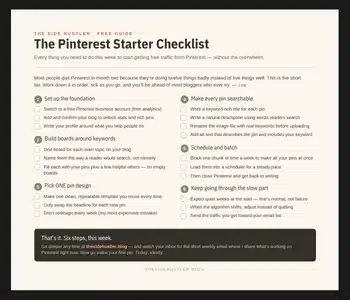
A strategy only counts when you run it. So I put the whole thing on one page, the free Pinterest Starter Checklist below walks you through your first week, step by step. Grab it and tick as you go.
Download Your Free Pinterest Starter Checklist
Grab the free one-page checklist that shows you exactly what to do first, next, and after that.
