
Table of Contents
This post contains affiliate links. If you click through and buy something, I may earn a small commission — at no extra cost to you. I only recommend tools I’ve actually used or thoroughly researched.
Most bloggers pour all their Pinterest energy into getting the click. And that’s important, without clicks, nothing else happens. But the click is only half the job. Good Pinterest landing page design is the other half.
What happens after someone lands on your page determines whether that Pinterest visitor becomes a reader, a subscriber, or a customer, or bounces straight back to Pinterest and never thinks about your blog again.
Pinterest landing page design is about making sure that second half of the journey is as well thought out as the first. This guide covers what makes a landing page work for Pinterest traffic specifically, and how to build pages that convert.
Recommended reading: How to Build Your Email List From Pinterest
Why Pinterest Traffic Needs Specific Landing Pages
Pinterest traffic behaves differently from other traffic sources, and your landing pages need to account for that.
Pinterest visitors are coming from a visual platform. They clicked because an image caught their attention and a headline made a promise. When they land on your page, they’re immediately checking whether the page delivers on that promise. If it does, they stay. If it doesn’t, if the page looks nothing like the pin, or the content doesn’t match what the headline suggested, they leave.
This is called the visual match problem. The design, tone, and content of your landing page needs to feel like a natural continuation of the pin that brought the visitor there. Jarring transitions between pin and page kill conversions.
Pinterest traffic is also predominantly mobile. According to Pinterest’s own data, the vast majority of Pinterest usage happens on mobile devices. Your landing pages need to be designed for a phone screen first, not a desktop screen that happens to also work on mobile.
Finally, Pinterest visitors are often in discovery mode, they found your content while browsing or searching, not because they already know who you are. That means your landing page needs to establish trust quickly. They don’t know you yet. Your page needs to change that fast.
Recommended reading: Pinterest for Bloggers, the full picture of turning Pinterest into a traffic source.
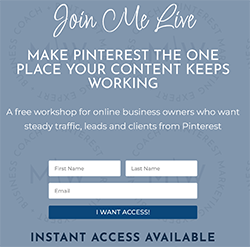
Free Pinterest Training Workshop
Content ideas are only useful if your Pinterest strategy is solid enough to make them work. Meagan Williamson’s free workshop — The Discovery Loop — covers the full system so your content gets found.
The Two Types of Pinterest Landing Pages
Before we get into design, it’s worth being clear on what we’re building. There are two main types of landing pages you’ll create for Pinterest traffic.
Type 1: Blog Post Landing Pages
Most of your Pinterest pins will link to blog posts. The blog post itself is the landing page. This is the most common setup and it’s perfectly effective, but only if the blog post is designed with conversion in mind, not just content delivery.
A blog post that functions as a landing page needs:
- A strong, clear headline that matches the pin
- Content that delivers on the promise immediately, no long preamble
- An opt-in offer embedded naturally within the content
- Internal links to keep readers exploring your site
- A clear next step at the end
Type 2: Dedicated Opt-In Landing Pages
These are standalone pages with one purpose, getting the visitor’s email address in exchange for a lead magnet. No blog post content, no navigation, no distractions. Just a headline, a description of what they’ll get, and an opt-in form.
Dedicated landing pages typically convert at a higher rate than blog posts because there’s no competing content pulling the visitor’s attention. But they require a specific Pinterest strategy, you create pins that lead directly to the landing page, usually promoting the lead magnet itself rather than a blog post.
Both types work. The right choice depends on your goal for a particular pin.
Pinterest Landing Page Design That Converts
Whether you’re sending Pinterest traffic to a blog post or a dedicated opt-in page, the same core principles of Pinterest landing page design apply. These build directly on the general fundamentals I cover in my landing page design guide, headline, above the fold, trust signals. Pinterest just adds a few requirements on top.
Match the Pin: Visually and in Copy
The headline on your landing page should echo the promise made in your pin title. Not word for word, but the same core idea, the same tone, the same specific benefit.
If your pin says “5 Pinterest Pin Design Tips That Get More Clicks” your landing page headline should not say “Welcome to My Blog.” It should say something like “Here Are the 5 Pinterest Pin Design Tips That Move the Needle,” same promise, delivered immediately.
The visual feel should match too. If your pin uses a clean, bright design with warm tones, a landing page that looks dark and cluttered creates a jarring transition. Consistency between pin and page keeps the reader in the flow.
Get to the Point Fast
Pinterest visitors decide whether to stay or leave within the first few seconds. Your most important content, the headline, the hook, the opt-in offer, needs to be above the fold. That means visible on the screen without scrolling, on a mobile device.
Don’t open with a long introduction about who you are. Don’t make them scroll to find out what the page is about. Lead with the value immediately.
Make Your Opt-In Offer Obvious

If you’re collecting email addresses, your opt-in form needs to be impossible to miss. That means:
- Placed high on the page, ideally within the first screen of content
- A clear headline that states exactly what they’ll get
- A simple form, name and email, or just email
- A button that tells them what happens when they click, “Send Me the Guide” beats “Submit” every time
For blog posts, embed your opt-in form naturally within the content, after you’ve delivered enough value that the reader wants more. Don’t wait until the very end of a long post to make the ask.
Load Fast
Slow pages kill conversions. Pinterest traffic is mobile traffic, and mobile users on potentially slower connections have zero patience for a page that takes more than a couple of seconds to load.
Check your page speed with Google’s PageSpeed Insights tool. Compress your images before uploading them. Keep your page design clean and avoid loading it with heavy plugins or scripts that slow things down.
A one-second delay in page load time can noticeably hurt conversions. It’s worth spending time on.
Remove Distractions on Dedicated Landing Pages
If you’re building a dedicated opt-in page for a lead magnet, remove everything that isn’t directly supporting the conversion:
- Remove the navigation menu, you don’t want visitors clicking away to browse your blog
- Remove the sidebar
- Remove unrelated links
- Keep the focus entirely on the opt-in offer
Every element on a dedicated landing page should either explain what the visitor will get or make it easier for them to sign up. Anything that does neither should be cut.
Lead Magnets That Work Well for Pinterest Traffic

Your opt-in offer, the thing you give away in exchange for an email address, needs to be directly relevant to the Pinterest content that brought the visitor to your page.
Pinterest visitors arrived because a specific pin caught their attention. Your lead magnet should be the logical next step from that content, a deeper resource, a practical tool, or a shortcut that builds on what they just read.
Lead magnets that convert well from Pinterest traffic:
Checklists and cheat sheets: quick, practical, immediately useful. Easy to create and high perceived value. A “Pinterest Setup Checklist” on a post about setting up a Pinterest business account is an obvious fit.
Templates: Canva templates, spreadsheet templates, email templates. Highly specific, high value, and very shareable on Pinterest itself.
Mini guides or ebooks: a short, focused resource that goes deeper on a specific topic. Works well for how-to content where the reader wants more detail than a single blog post provides.
Email courses: a short sequence of emails that teaches a specific skill. Higher commitment to sign up, but tends to attract more engaged subscribers.
Workbooks: particularly popular in personal development, finance, and business niches. Printable resources feel tangible and valuable.
The key is specificity. A generic “subscribe to my newsletter” ask converts poorly from Pinterest traffic, and it’s exactly the kind of soft ask that fails to convert pinterest traffic into real subscribers. A specific, relevant resource that solves the exact problem the pin addressed converts a lot better.
Full guide: Freebies to Grow Your Email List
Free Pinterest Training Workshop
Content ideas are only useful if your Pinterest strategy is solid enough to make them work. Meagan Williamson’s free workshop — The Discovery Loop — covers the full system so your content gets found.
Email Marketing Tools for Your Pinterest Landing Pages
You need an email marketing tool to collect addresses and deliver your lead magnet automatically. The tool handles the opt-in form, the welcome email, and the follow-up sequence.
The ones worth knowing about for bloggers:
MailerLite, a very clean interface, a generous free plan, and a good landing page builder built in. It’s what I use right now, it does everything I need without the bigger price tag, which is why I point most beginners here first.
Kit (formerly ConvertKit), a popular choice for bloggers and content creators, with a clean landing page builder, excellent automation, and a free plan that runs up to 10,000 subscribers. It’s the one a lot of bloggers move to as their list grows.
GetResponse, more feature-rich than the other two, with a built-in website and landing page builder that’s more flexible for dedicated opt-in pages.
All three integrate easily with WordPress and all three let you create landing pages without needing a separate tool.
Full comparison: Kit vs MailerLite
A Simple Pinterest Landing Page Setup That Works
If you’re starting from scratch, here’s the simplest setup that covers all the bases:
- Choose your lead magnet: a checklist or template relevant to your most popular Pinterest content
- Create a dedicated landing page using your email marketing tool’s built-in builder, Kit, MailerLite, and GetResponse all have this
- Write a headline that matches your pin promise: lead with the benefit
- Keep the form simple: email address only if possible
- Set up a welcome email that delivers the lead magnet immediately
- Create 3–5 pins promoting the landing page: use the lead magnet benefit as the pin headline
- Schedule those pins consistently alongside your regular blog post pins
That’s the whole system. It doesn’t need to be complicated, it just needs to be set up properly and pointed at the right audience.
If you want to understand how to build this into a complete Pinterest strategy, not just the landing page but the whole traffic and conversion funnel, Meagan Williamson’s Pinterest course covers it from end to end. It’s the one I took when I was getting my own account right.
Final Thoughts
Pinterest landing page design isn’t about having the most beautiful page. It’s about matching your pin’s promise, loading fast, and making it easy for a mobile visitor who doesn’t know you yet to take the next step.
Get those things right and your Pinterest traffic starts converting into something more valuable than a pageview. A subscriber is worth far more than a visitor who bounces, and a well-designed landing page is what makes the difference.
Next step: Pinterest Group Boards
A landing page only earns its keep when traffic’s flowing to it. The free Pinterest Starter Checklist below shows you how to get your pins working so that traffic actually shows up. Grab it below.
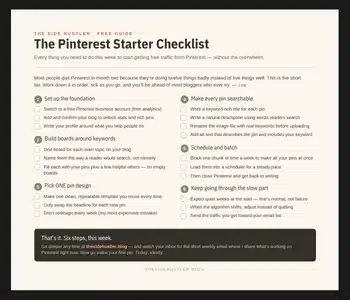
Download Your Free Pinterest Starter Checklist
Grab the free one-page checklist that shows you exactly what to do first, next, and after that.
