
Table of Contents

This post contains affiliate links. If you click through and buy something, I may earn a small commission, at no extra cost to you. I only recommend tools I’ve actually used or thoroughly researched.
An AI powered Pinterest workflow has quietly changed how I work. The parts that used to eat my time, writing pin titles and descriptions, now move fast, and those were always the slowest jobs in my week. Staring at a blank field, trying to phrase something that’s both keyword-friendly and readable, is tedious work.
AI tools have made that a lot faster. Not by replacing the thinking, you still need to know your keywords, your audience, and your content, but by handling the drafting so you can spend your time editing instead.
This guide covers exactly how to use AI for Pinterest in a way that saves real time without making your content sound generic or robotic, and at the end, I’ll show you how far I’ve taken my own AI powered Pinterest setup.
Recommended reading: Pinterest Keyword Research
What AI Can and Can’t Do for Your Pinterest Strategy
Before you build an AI powered Pinterest routine, be clear about what AI is and isn’t good at, there’s a lot of hype around these tools right now.
What AI is good at for Pinterest:
- Drafting pin titles quickly from a keyword and topic
- Writing pin descriptions that hit the right structure
- Generating batches of content ideas for your niche
- Rephrasing existing descriptions to create fresh variations
- Helping you brainstorm board names and descriptions
What AI can’t do:
- Replace your keyword research, you still need to find the right keywords first
- Guarantee your content gets found, that’s down to your SEO and consistency
- Add real personal experience to your recommendations, that has to come from you
- Make the decisions about what to create or promote
Think of AI as a very fast first drafter. It produces something to work with. You edit it, add your voice, weave in your keywords properly, and make it good. That combination, AI speed plus your judgment, is where the real time saving comes from.
Free Pinterest Training Workshop
Content ideas are only useful if your Pinterest strategy is solid enough to make them work. Meagan Williamson’s free workshop — The Discovery Loop — covers the full system so your content gets found.
How to Use AI to Write Pinterest Pin Titles
Pin titles are one of the most time-consuming parts of creating Pinterest content at volume. When you’re making 3–5 pin designs per blog post and writing a different title for each, it adds up fast.
Here’s a simple workflow using any AI tool, ChatGPT, Claude, or similar:
The prompt:
“I’m creating Pinterest pins for a blog post about [topic]. The primary keyword I want to target is [keyword]. Write 5 different pin titles that include this keyword naturally, are specific and benefit-driven, and are under 100 characters each.”
That prompt gives you 5 working titles in about 10 seconds. You then pick the best ones, tweak any that don’t quite fit, and you’re done.
A few things to check on AI-generated titles:
- Does the keyword appear naturally, or does it feel forced?
- Is the title specific enough, does it tell the reader exactly what they’ll get?
- Is it under 100 characters so nothing gets cut off in search?
- Does it sound like a real person wrote it, or like a robot?
Edit anything that doesn’t pass those checks. AI gives you a starting point, your judgment decides what goes live.
How to Use AI to Write Pin Descriptions
Pin descriptions are where AI saves the most time. Writing a 100–150 word description that includes your keywords naturally, expands on the title, and ends with a call to action is straightforward but repetitive, exactly the kind of task AI handles well.
The prompt:
“Write a Pinterest pin description for a blog post about [topic]. Primary keyword: [keyword]. Related keywords to include naturally: [list 2–3]. The description should be 100–150 words, written in a conversational tone, and end with a clear call to action. Don’t keyword stuff, write for a human reader first.”
The “don’t keyword stuff” instruction matters. Without it, AI tools tend to repeat keywords awkwardly. With it, you get a more natural result that needs less editing.
After the AI generates your description:
- Check the keyword appears in the first sentence
- Check the related keywords feel natural, not forced
- Make sure the call to action is specific, “read the full guide” beats “click here”
- Read it aloud, if it sounds unnatural, it needs editing
Full guide: Pinterest Pin Titles and Descriptions
How to Use AI to Generate Pinterest Content Ideas
One of the most useful jobs for AI on Pinterest is content ideas. When you’re staring at a blank content calendar trying to work out what to pin next, AI gives you a starting point fast.
The prompt:
“I have a blog about [niche]. Give me 20 Pinterest pin ideas for content that would perform well in this niche. Focus on topics with high search intent, things people are actively looking for answers to. Include a mix of beginner-focused and intermediate content.”
You’ll get a list of 20 ideas in seconds. Most won’t be exactly right, some too broad, some off your angle, but you’ll almost always find 5–8 really useful ones in there to develop into proper content.
This is AI at its most useful: not replacing your creative thinking, but giving you raw material to react to rather than starting from nothing.
How to Use AI to Write Pinterest Board Descriptions
Board descriptions are one of those jobs most bloggers put off because they feel minor, but they matter for Pinterest SEO. AI makes them fast.
The prompt:
“Write a Pinterest board description for a board called [board name]. The board is for [describe your blog and audience]. Include these keywords naturally: [list 2–3 keywords]. Keep it to 2–3 sentences and make it sound like a real person wrote it.”
Done in 30 seconds. Edit for accuracy and voice, and move on.
How to Use AI to Create Fresh Pin Variations
One of the best uses of AI for Pinterest is creating fresh variations of existing pin descriptions. Pinterest rewards fresh content, new images with new descriptions linking to the same URL, so you need to keep making new pin variations for your best posts.
Writing a slightly different version of a description you’ve already written is tedious. AI makes it fast.
The prompt:
“Here is an existing Pinterest pin description: [paste description]. Rewrite it as a fresh variation, keep the same primary keyword and call to action, but change the phrasing, angle, and structure so it reads as clearly different content. Keep it 100–150 words.”
You get a fresh variation in seconds. Check it passes the same quality checks as an original, keyword placement, natural language, clear CTA, and schedule it.
AI Tools Worth Using for Pinterest
ChatGPT: the most widely used AI tool and a solid choice for pin title and description writing. The free version handles everything in this guide. The paid version (ChatGPT Plus) gives you more advanced models and faster responses. It’s also what I use to generate my actual pin images.
Claude: another strong option for writing tasks, particularly good at following detailed instructions and holding a consistent voice. It’s the one I’ve built my own setup around (more on that below). Worth trying if you find ChatGPT’s output too generic for your tone.
Canva’s AI features: Canva has AI tools built right into its design interface, including a text generator that can help with pin headlines and descriptions without leaving the editor. Handy for keeping your whole workflow in one place.
Meagan Williamson’s course tools: if you want AI help that’s already shaped for Pinterest, the course I took includes ChatGPT-based tools that draft pin titles and board descriptions for you. I’ve used them and they’re a real time-saver. They won’t run the whole thing end to end, you still bring the keywords and the judgment, but for the jobs they cover, they do them well. It’s also where the Pinterest SEO and pin-writing approach the prompts above lean on comes from.
Free Pinterest Training Workshop
Content ideas are only useful if your Pinterest strategy is solid enough to make them work. Meagan Williamson’s free workshop — The Discovery Loop — covers the full system so your content gets found.
The Right Way to Use AI for Pinterest (And the Wrong Way)
The right way:
- Use AI to draft, then edit with your own judgment and voice
- Always do your keyword research first, AI needs the right keywords from you
- Check every output before it goes live, AI makes mistakes
- Use it for speed, not as a replacement for strategy
The wrong way:
- Copy AI output straight out without editing, it’ll sound generic
- Let AI pick your keywords, it doesn’t know what’s actually being searched on Pinterest
- Use AI to create content you have no real knowledge of, personal experience still matters
- Publish AI content at volume without quality checking, quantity without quality hurts your distribution over time
I use AI tools daily in my blogging workflow, for Pinterest content, blog post outlines, email drafts, and more. The time saving is real. But the quality control is non-negotiable. AI gives you a faster starting point. You’re still responsible for where you finish.
A Simple AI Powered Pinterest Workflow
Here’s how to put an AI powered Pinterest workflow together in practice, the simple version that anyone can start with today.
When creating pins for a new blog post (about 20 minutes total):
- Do your keyword research on Pinterest first, note your primary keyword and 2–3 related ones (5 minutes)
- Prompt AI for 5 pin title options using your primary keyword (2 minutes)
- Select and edit the 2–3 best titles (3 minutes)
- Prompt AI for a pin description using your keywords and title (2 minutes)
- Edit the description, check keyword placement, natural language, CTA (3 minutes)
- Open Canva and create 3 pin variations using your titles (5 minutes with templates)
Total: around 20 minutes per blog post for a full set of pin variations. Compare that to doing it all by hand and the time saving adds up fast.
Where I’ve Taken This: My Own Custom AI Setup
Everything above is the accessible version, open an AI tool, prompt it, edit, done. But I want to be straight with you about how far I’ve personally pushed this, because it’s a big part of how I keep up with Pinterest at all these days.
Over the last 18 months I’ve built my own custom AI project inside Claude, running on Anthropic’s most capable Opus model. I tested the same setup across ChatGPT, Gemini, and a few others, and for this kind of work Claude has been the best of the bunch by a clear margin, it follows detailed instructions and holds my voice better than the rest.
Here’s roughly what it does. I give it my blog’s sitemap, and it handles the content planning from there. For each pin it drafts the title, the description, the alt text, and the SEO-rich text overlay copy, then tells me which board to post to and assigns a posting timeslot aimed at my US audience. I generate the actual pin images with ChatGPT, and the rest of the pin is built around them. Right now I have it set to produce five pins a day, and that pace is working well with Pinterest’s newer algorithm.
It’s not a magic button. When my account stalls or dips, I go back in and tweak the setup until things pick up again. It’s not perfect, but it saves me a serious chunk of time every single day, and right now it’s doing a great job.
I’m not telling you this because you need anything this involved, you don’t, especially when you’re starting out. The simple prompt-and-edit workflow above will take you a long way. I’m telling you because it shows where an AI powered Pinterest setup can go once you understand the fundamentals and decide to build on them.
Final Thoughts
An AI powered Pinterest workflow isn’t about replacing your strategy, it’s about removing the tedious parts so you can focus on the bits that need real judgment and real experience.
Use it for drafting titles and descriptions, generating content ideas, and creating fresh variations of existing pins. Edit everything before it goes live. Keep your keyword research human. And make sure your own voice and experience still come through in the final result.
Done right, AI makes your Pinterest workflow a lot faster without making your content worse. That’s the whole point.
Next step: Pinterest Landing Page Design
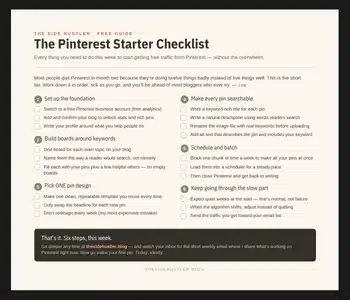
AI speeds the work up, but the fundamentals still come first. The free Pinterest Starter Checklist below covers those fundamentals, every step you need this week, on one page. Grab it and let AI handle the rest.
Download Your Free Pinterest Starter Checklist
Grab the free one-page checklist that shows you exactly what to do first, next, and after that.
